Showing posts with label Google. Show all posts

Should You Embed Videos From YouTube For SEO? Google Has The Answer

Embed Videos from YouTube for SEO
Contrary to popular belief, content remains supreme as far as digital commerce strategies are concerned. But like many things in this world, it too evolves.

These days, content seems to be more engaging and thus more likely to convert readers to customers when visually appealing. One study even suggests that a landing page with a video, for instance, could help a company land new deals by as much as 80%.

Visuals are endearing to the public for a variety of reasons. The Social Science Research Network previously revealed that about 65% of the population are visual learners. They understand something more effectively when texts come with pictures or videos.

Second, the brain is more efficient in processing images than texts. It can work on over 60,000 photos, according to studies. Third, more people are using mobile devices with incredible processing speeds and excellent graphics. In other words, pictures and videos appear so much better-and hence appeal-to a growing number of mobile users and shoppers.

Taking advantage of SEO web services further maximizes the power of videos in marketing. Specialists can now use them to boost traffic and help strategic pages land in the top search results.

But there's a bone of contention here: should someone embed these videos, say, from sites such as YouTube? Or should they produce their own and host them in their preferred servers? Fortunately, Google has a straightforward answer.

Either Works, Google Says

While videos are now an essential tool in content marketing, marketers and digital entrepreneurs seem divided on where to get them. Some say they may be better off with videos from well-known platforms such as YouTube (also owned by Google). Not only is it more cost-effective, but it also spares marketers the time-consuming process of creating a video from scratch.

However, others say that it's not the best idea since these videos can compete with the landing pages in the search results. As an example, let's pretend that you have a blog post with "affordable houses in Atlanta, Georgia" as the primary keyword. The pundits for more personalized videos claimed that the video you embed on this blog post could appear first instead of the article you wrote. It could then drive traffic away from your site, defeating the purpose of the video.

Instead, one can create videos and then use content delivery networks (CDNs). These are a congregation of servers located in different parts of the world whose job is to hasten the delivery of files that belong to a particular content like a blog. Thus, videos and images load more quickly in this manner.

But in a recent discussion, the senior webmaster analyst of Google John Mueller shared that it doesn't really matter where and how the videos end up on the content page of a website. After all, they have the same SEO value whether they have been embedded from YouTube or any of the servers chosen by the content creators.

The primary reason goes back to the core of Google's search results: in the end, it's all about the value of the content.

This could also explain why a YouTube video's landing page could end up at a higher place than the content page where you embed it. As Mueller said, it may happen if Google's algorithms believe that the video itself contains more information than the content you've made.

How Long Form Helps

The bottom line is when it comes to better SEO, it's no longer a question of whether you should have something visual in your content like a video. What you need to focus on is how to use it to enhance your content while increasing your chances of appearing on the first page of your chosen keyword's search results.

One of the best strategies is writing in long form. As its name suggests, long-form content is a page that contains over 700 words. It can go as long as 3,000 to 5,000 words. Believe it or not, this tactic produces high conversion rates. It could be because:

  • Long form helps you add more value to your content. You can explain topics, and their subtopics, more effectively.
  • You can include more primary and secondary keywords. You can even have related keywords, and all these can make your article more search-friendly.
  • Long form gives you the chance to build your credibility. Some excellent types of long-form content are white papers, such as research, surveys, and case studies.
  • You can add other media files besides videos.
 
Muelle's statement only repeats what Google has been saying: give something valuable, and you'll likely get the placement you want in the search results. From an SEO standpoint, this works regardless of where the video comes from

How Can Health Kit And Google Fit Help To Develop A Fitness App

Google Fit Help To Develop A Fitness App
With the advent of new healthcare apps, the healthcare industry is shaping itself and finding new ways to evolve. Healthcare providers, with the help of programmers and software developers, make sincere efforts to deliver the best solutions to patients. But, it isn’t only limited to the healthcare providers only, and you can also come up with a unique idea of developing a healthcare app. And to achieve that, you just have to use some examples provided by Apple and Google.


Why Should You Opt For Google Fit And HealthKit?

As we all know, these are the industry leaders in developing modern technology, they present some of the best solutions with their innovative apps, especially in the healthcare niche. And here is why such an approach is suitable for both the developers as well as users.

HealthKit & Google Fit For Developers And Users

Despite both these platforms have a similar formatting structure and standard storage, they also let users share and exchange health apps and data between many devices too.

One of the major pitfalls of the healthcare apps has been that they don’t let the users share or exchange essential data. To be honest, this posed a great deal of hassle for the developers who make sincere efforts and work hard to fix the bugs. In other words, a doctor can’t have access to the patient's data unless he/she has to develop a separate application so as to facilitate it.

In case you deal with the production of healthcare tracking devices, then you have to integrate Bluetooth Smart standards with both these platforms. And if you want to save your data to Google Fit, then it needs to have another app that is fully supported by Android devices.

But everything is much simpler and different when it comes to Health Kit because there is no need to adopt Bluetooth Smart standards. As the iOS platform has already been an integrated tool that fully supports other healthcare tracking devices. In addition to this, it may also include other conditions such as the temperature of the body temperature and blood pressure. In simple words, you will be able to use any iOS app in order to keep in touch with information related to healthcare in HealthKit.

As for the users, they can get benefitted from the precise image of their health condition. Both Google Fit and HealthKit offer a full set of necessary health data, and users are always allowed to switch between them without any risk of losing any critical data during transmission.

Differences In Designs Between Google Fit And HealthKit?

Google Fit

When it comes to usability, Google Fit has some disadvantages in spite of having a user-friendly design. The constant need for swiping the screen so as to reveal extra data or access a section is the main drawback of Google Fit. Furthermore, all the set data/information is very well structured that lets the users instead focus on other important parameters that include- miles and calories.

Moreover, if you don't have the convenience of using your phone while working out, then Google Fit offers the right solution. You will be able to make free records along with the preferable exercises. This app will automatically track the number of steps you have made and also indicate the information delivered to the platform. Moreover, you will also be able to access any data either by a mobile or from their official website of Google Fit.

HealthKit

As far as this platform is concerned, it features a complex structure if compared to other applications that are developed for iOS devices. However, it still possesses some major advantages by letting you compare your healthcare information without the need for various active screens.

Moreover, you are free to choose a particular data on a single screen and can also select the information retrieved within a certain period of time. The platform provides information on all possible apps as well as devices that can be further integrated. You can also choose any device that can have access to your healthcare data.

What Are The Types Of Fitness Data

Both Google Fit and HealthKit can be utilized to store important healthcare information. To know this, we will be dividing the data into two main groups such as-

Data From Fitness Apps

The HealthKit and Google Fit can record parameters from fitness apps, and the data generally includes-
  • Sleep Tracking & Heart Rate System
  • Physical Activities or Favorite Kinds of Sports
  • Weight and Height History
  • Different Body Measurements & Parameters

Data From Medical Apps

Both of these systems are able to record healthcare information from the medical apps but in a much different way. One of the issues is that Google Fit does not allow data sharing between different apps. Moreover, it also makes the system inefficient in some way, especially when it comes to medical applications.

Whereas, HealthKit is more oriented towards medical applications that make room for easy access to patient data by the doctors. The best part of this platform is that you don’t even need to step outside your comfort zone to provide information to the doctors. The data can include the following-
  • Pulse, Blood pressure, and Temperature
  • Treatment courses and medications, dosages and prescriptions
  • Tracking data during sleep
  • Lab procedures and statistics

In order to defend sensitive personal data from any 3rd parties, both Google Fit and HealthKit feature the most efficient security from other fraudulent activities.

Then Bottom Line

Besides there obvious shortcomings and considerable benefits in certain areas, it is hard to determine a sure-shot winner between the two of them. It is without any doubt whatsoever that HealthKit is more inclined towards making the life of patients as easy as possible, whereas Google Fit has proved more like a fitness tracker providing all fitness information with less limited access.

These applications go hand in hand with and certainly so because they are meant to be that way. Both of these are now a fitness hub in themselves and are more fitness oriented. This lets the user to share important information with the help of different devices. If you also want to make your own healthcare app, then you will simply need to remove these drawbacks.

AUTHOR_NAMEAbout the Author:
Sunit Panwar is a Chief Technology Officer (CTO) in a highly reputed company- RV Technologies. Being a passionate individual, he is known to implement the newest technologies in both website development and innovative mobile app development. His unique ways of working with the advanced functionalities and tools makes him quite inspiring to the developers.

Most Interesting Stats And Facts About Google

Interesting Stats And Facts About Google
Google has just crossed the 20-year-old mark last September 2018, and for many entrepreneurs and business-folk, the rags-to-riches story of the $120 billion multinational tech titan is a very inspiring tale.

From its humble origins as a mere research project at Stanford University by founders Larry Page and Sergey Brin in 1996, Google has grown in leaps and bounds. Today, some 4.5 million queries worldwide are typed into the search engine each minute, which just goes to show how indispensable Google is in daily life.

Instrumental to Google’s success is the legendary “Don’t Be Evil” manifesto: a jab of sorts at stereotypical corporate culture, particularly at Google’s competitors at the time, who, according to Gmail creator, Paul Buchheit, “...in our opinion, were kind of exploiting the users to some extent."

This user-first philosophy is what governs most of Google’s directives when ranking websites on a search engine results page. With over 200 factors determining a website’s search relevance and authority, the key consideration is to always deliver the highest possible quality content and online experience to anyone using the search engine. A positive user experience results in trust, and trust, in turn, ensures repeat usage.

The proof is in the figures. In 2018, Google commands an impressive 86.28% market share on desktop and upwards of 93% on mobile, beating out Bing, Baidu, Yahoo!, and other search engines.

Even as Google continues to dominate online search, the tech company has evolved to accommodate its growing business interests. In 2015, the company had undergone a massive corporate restructuring, resulting in the emergence of a parent holding company Alphabet Inc., with Google as its main subsidiary for all of its Internet-based interests (including search, online advertising, cloud computing, email, and other online business services).

Meanwhile, Alphabet is free to follow its own upward trajectory at the same time, further diversifying through numerous off-line investments and acquisitions such as R&D, life sciences, green energy, investment capital, and future tech.

Which is why Google’s rise and continuing success makes for an interesting business lesson for entrepreneurs, managers, growth hackers, and students alike. Virtually every detail of the company’s long history has been studied by enthusiasts and experts, with many hoping to replicate the Internet giant’s success elsewhere. Here is an infographic outlining some of the most interesting stats and facts about Google for you to check out.

Check out more:
Interesting Stats And Facts About Google

What Will Android Look Like In The Next Five Years?

What Will Android Look Like In The Next Five Years?
Well! We all are familiar with android almost every person who owns a smartphone today has Android running on his device. Google launched android way back in 2008 with a hope of creating a user-friendly and stable operating system for touch screen based smartphones. However, today android has gone past that initial thought that germinated it. Android TV for televisions, Android Auto for cars, and Wear OS for wrist watches are some of the extensions of Android that Google might have not thought for when it launched the Android.

From the day it was launched android has only seen growth. The upward trajectory hasn't stopped and many versions of Android have been launched such as KitKat, lollipop, cupcake etc. What was supposed to be an alternate mobile experience is now running on around 88 percent of all smartphones.

Talking on the business front almost all the popular e-commerce entities and businesses have an Android mobile app as the chief source of customer interaction. More and more firms are looking to hire an Android developer to get the app developed for their businesses. Android’s popularity in the business domain can be substantiated by the very fact that firms look to hire android developer when the idea of having an app for their business surfaces.

As an Android lover, if you have thought that you have seen it all in the path of its growth then you are totally wrong. Google is not sitting idle, cashing on the success of Android. Yes, Google is working for the advancement of this amazing mobile Operating System (OS).

Ever thought what would be the future of Android or how it would look in the coming 5 to 10 years. Well, if you have thought about that (or even if you haven’t) then to give your imagination and curiosity a taste of actuality we would discuss the future of Android right here.

So, carry on reading as you are about to get into the future of what your popular OS would be like. Let’s get on the way.

Interface

The interface is something what we usually interact with while using android on any smartphone (or say on any of the devices). The user interface or the interface is the platform through which we give commands, to the smartphone's display. As you have already noticed that every time there is an update for Android it comes with an enhanced mechanism for an interface which provides a better experience and a more user-friendly interface.

So, in the coming time, you can expect a more refined and enhanced user interface that can go beyond that face detection mechanism. Maybe something that can understand your gestures and operates accordingly.

Artificial Intelligence (AI)

Artificial Intelligence (AI) is something we have been hearing more often than not. AI refers to the ability of a machine through which it can learn itself and make decisions just like humans do. AI is in the initial stages of its public use and what we see and use is just the beginning. When I say we are using AI then I want to highlight apps like Google assistant
What Will Android Look Like In The Next Five Years?
In about the next 5 years the Google Assistant is going to be so good that people won’t even need a living being as their assistance as they will have Google assistant up for the task. Android’s Google has the potential to become the backbone of everything on Android. Even today Google assistant is good enough to make phone calls, to set a dinner reservation or to stitch together multiple exposures to make the best photo possible, so just imagine what it would be capable of doing in 5 years from now.

It’s not just Google assistant , you might have heard of IOT (internet of things ) which is basically setting up a connection between everything you have around you such as your refrigerator, air conditioner, mobile phone, your television set, car and every other thing that can optimize and has unknown amount of benefits. Well, here Amazon is the one who has taken lead by its project called Alexa which is opened to third parties.

Augmented Reality (AR) And Virtual Reality (VR)

When the words Virtual Reality (VR) and Augmented Reality (AR) come to our mind the first thing that comes to our mind is high-end games. However, Google has a vast application for this technology, but don’t confuse yourself with AR, VR and vice-versa.

Augmented reality and virtual reality are like 2 faces of the same coin. Augmented reality layers a virtual world in the real world and virtual reality is like a total simulation that creates a virtual environment for the user and has nothing to do with reality.

Google has already designed its own software framework for this technology. That’s in addition to making it more compatible with its recent juggernaut Google pixel, just what it would be like after its been completed and available for commercial purposes. It’s not just limited to a smartphone this technology is also used in the medical field where it is used to diagnose human cells and find out the ones that are infected. If this technology becomes commercial it’s going to change the way people live.

Potential Replacement

“There is always someone or something better”. Well google for a long time is working on an operating system that is potentially said to replace the android system in the future, however, there is no announcement for it. This operating system is called fuchsia and is based on a new microkernel called "Zircon" rather than Linux Kernal which is used by Android and Chrome OS. Zircon is a small operating system which is intended to be used on embedded systems. This upcoming operation systems application is written with flutter which enables cross-platform development options.

Well, we hope that by know your curiosity might have settled and you have got the answer to the question with which we started our discussion. To conclude the discussion we can say that android is in the process of evolving itself. The plans are ready with Google and the work on its future outlook is already underway. For the time being, we can assume that the future Android would look far better than it uses to look 5 years ago and we can also say be sure that it is going to be more user-friendly after 5 years. “Android for sure will change the way we see and look at the world around us “.

For more such exciting content stay connected with us and feel free to share your thoughts in the comment section below.

AUTHOR_NAMEAbout the Author:
Denny Kelly is a Marketing Manager at AIS Technolabs which is Web design and Development Company, helping global businesses to grow. I would love to share thoughts on enterprise android app development and Game Design Development etc.
Find Me On Facebook | Twitter | Google+ | LinkedIn

Review of Google Allo - A Smart Messaging App

Review of Google Allo - A Smart Messaging App
The Allo is a smart messaging app from Google which lets you express yourself better by saying and doing a lot more through text. It is one type of Google Assistant.

What Can You Do With Google Allo?

  • Use more Stickers
  • Shout/Whisper
  • Smart Reply
  • Ink
  • Go in incognito mode
  • Meet with your Google Assistant

What’s Best?

It is featured with Google Assistant and available for both iOS and Android devices. The incognito mode allows the best end-to-end encryption and privacy.

What’s Not Good?

It doesn’t have video calling feature and GIF support. You cannot control the read receipt settings.

Cost: Free

We all have an array of choices for sending texts and media to our friends and relatives from our phone or computer. But, Google thinks that we need one more messaging app which is smart also, and it added it too.

The search giant company has launched ‘Allo’ in September 2016. Google has tried to answer or wanted to create an alternative to WhatsApp and WeChat messaging applications. And Google is succeeded to create a smart and easy-to-use messaging app for its consumers.

How Google Allo Differs From The Other Messaging Apps?

Google has made Allo stand out from the pack by integrating Google Assistant into it. We all know about ‘Google Now’ and how it works. The Allo Google Assistant works in this same manner. It saves your time and provides you the best information whenever you need.

Allo Google Assistant is a bot which uses the vast database of Google to let you know the answers to the questions raised in your mind. For example, if you want to find about ‘Sports’ then you will get results in Allo Google Assistant like below.
Review of Google Allo - A Smart Messaging App
It also translates languages if you want and allows you to chat with your friends and family members any time you want. If you are feeling lonely, then you can play games with it too.

Yes, it is absolutely right that for simply searching queries, the preferable way is pressing the home button of our device and then go to the Apple’s Siri or Google Now. But, the advantage of Allo Google Assistant is, you can use it simultaneously while you are sending texts to your friends and relatives. You can even ask verbal questions to it while the app is open. You can look for something without leaving the app, which makes it differ from other standard messaging apps.

Other Useful Features Of Google Allo

  • It learns your previous answers to some particular questions and suggests you the options when the same question is asked again.
  • The suggestions not only in the form of text, but you can even choose from Emojis and even photos.
  • You can add text to the photos before sending and also can doodle them to show your creativity.
  • Hundreds of stickers designed by the worldwide independent artists and studios let you choose your best-expressing sticker on Google Allo.
  • Generally, when you want to point out something in a messaging app, you send it in ALL CAPS. But Google Allo lets you change the size of the text with a quick swipe and allows you to say it quieter or louder depending on your mood.
  • The Incognito mode allows you to have an end-to-end encrypted conversation. It keeps your chat private and gives you the control of the durability of the messages you send with expiring chats.

Should You Switch To Google Allo or Not?

In the title, I have mentioned it a smart messaging app. I absolutely mean it too. The app quality is fine, and the chat stuff is perfect. The advantage of Google Assistant is helpful too for the people who do not want to change the screens or go out of the messaging window for looking to something. But, if you ask me whether you should switch to Allo or not? My answer will be, wait for some time. We have seen the Google experiments over the Google Hangout and Google Plus for the messaging options. But, it flailed around in its social attempts. But, as the messaging is the epicenter of our phone usage, Google has smartly tried to jump over directly onto it. But, as per its predecessor attempts, Google needs a fresh and cool start in the messaging strategy.

Bottom Line

On the day 1, Google Allo doesn’t seem to be perfect for a communication way. But, the integrate, and well-known Google Assistant sets the Google Allo something to be more interested and smart messaging app in the recent times. But, seeing with the technology perspective, there are other options which have already made their place as a well-developed messaging application. So, without fireworks in the background, not allowing the message to be invisible and the lack of video calling feature can make it hard for ‘Google Allo’ to become a favorite chat messaging app in the near future.

AUTHOR_NAMEAbout the Author:
Mandip is a graduate in Information and Technology. He is a passionate blogger, SEO Specialist, and a Software Developer. He loves to write on technology, SEO, micro job websites like Fiverr and Internet Tips and Tricks. Currently he blog at Best On Internet.

What Do You Know About SEO and Google Penalty?

What Do You Know About SEO and Google Penalty?
When developing a website, most business owners often focus on some specific things that make a good website such as designing, slide bar, and suitable color scheme. But, they avoid focusing on content and search engine optimization of their website. The appearance and interface of your website create the first impression and engages your users to read and dive into your site. But, content also plays an important part in engaging your users as well as make your site SEO friendly.

Being an SEO expert, you must know the power of original content on your web pages and blogs. Duplicate content on your website is one thing which every professional will suggest you avoid using. Apart from content, there are several other things that can make your site penalized by the Google.

You must understand that Search Engine Optimization is a simple way of drive web traffic to the website via search engines. In this post, you will find some significant things about Google penalty and search engine optimization.

Before starting the post, i would like to request to must check out LinkOkay which is best backlink monitor so that you can monitors all backlinks, grow traffic and avoid panelties.

Google Penalty

Google has been updating its algorithms since Dec 2000 while releasing its toolbar extension. This update showed a major change in website ranking and evolved the SEO industry. With the time, Google kept refining the quality of its search results and updating algorithms. Moreover, it started eliminating poor quality content and raising the engaging yet unique content to the top of the result pages and this is where penalty comes in. Over time, the Penguin update was introduced in 2012 that wiped out some websites (with poor quality content) out of the Google Search completely and made expert careful about their content strategy.

Recognizing a Penalty

The Google Penalties can be manual or automatic. With manual penalties, you’ll generally be informed, but you might not know that you’ve been targeted if the reason is algorithmic.
  • If your site is not ranking well and frequently losing its positions.
  • Any page of your website is slipping back to 2nd or 3rd pages without any action from your side.
  • All the web pages have been eliminated from Google’s cached search results in a day.
If you face one or more of these difficulties, you can be assured that a Google's penalty has influenced your website. In this case, you should use a reliable penguin penalty checker.

Why does Google Penalize Your Site?

Google is constantly updating its algorithm and way it indexes your website. But, it doesn't provide any kind of details about the changes and their solutions. Here are some of the reasons that might become a reason for the penalty:
  • Buying links: If you’ve been creating or buying bad links, your effort could be considered as an attempt to manipulate PageRank.
  • Duplicate content: Undoubtedly this is one of the most obvious reasons that can make your site penalized. Any duplicate content on your website makes it less valuable in Google’s point of view, and that might result in a penalty.
  • Unique content: Make sure your content is 100% plagiarism-free and written in a professional way. The properly structured content help you with SEO.
  • Internal 404: Google wants to know that you provide useful content to your users without any errors and problems. If you’re getting 404 error on your website, it’s a clear signal that your site visitors aren’t getting the information they are looking for.
  • Keyword stuffed content: There are several kinds of rules or perception about keyword density in your content. All these rules aren't proven but a high keyword density is a remark of poorly written content. If Google detects keywords stuffing on your website, it may penalize you anytime.
  • Overused H1 tags: The H1 tag helps Google recognize what the page or website is about. But, Google considers excessive H1 tags as an attempt to manipulate PageRank.
  • Backlinks from websites in other languages: If you are getting a legitimate link from a site in another language, it might be counted against you.
  • Hidden links: Every link on your site must be visible and valuable to visitors. The hidden link is considered as a suspicious backlink.
  • Broken external links: You really need to keep your links up-to-date. Check all the web pages and backlinks on a regular basis and assure that they aren't giving 404 error.
  • Dealing with Google's Penalty: So, you have already penalized by Google but don't worry. Most of the penalties may be fixed with a little effort. With some easy solutions, you might get rid of it.
  • You can use Disavow tool to ask Google to remove the troublesome links that may be harming your website.
  • While disavow is a widely-used option, it’s not the best. You really need to put some efforts to get some of the links taken down manually.
  • You should also update the content of your website while eliminating keyword stuffing.
Sometimes Google takes a while to re-crawl your site and disavow requests. Experts also recommend abandoning a site instead of fighting a Google penalty.

AUTHOR_NAMEAbout the Author:
Ankur Purohit works as a project coordinator at Baymediasoft – a WordPress Development Company. Passionate about the technical writing; Gaurav Mali has been involved in the cutting edge landscape of App and mobile app development for three years.

Brillo - Google’s New Operating System For IoT

Brillo - Google’s New Operating System For IoT
Bringing the simplicity of software development to hardware for IoT (Internet of Things) by using the embedded OS, developer kit, core services, and developer console, Google has introduced its new Operating System – Brillo. It was announced at Google I/O in May-2016, and since then, no further details were shared by Google.

Brillo has mainly three elements:
  1. Developer Kit
  2. Core Platform Services and
  3. Android-based Embedded OS

The BDK (Brillo Developer Kit) runs on Ubuntu 14.04 and is based on the build architecture of Android.mk. it can perform local unit tests and individual integration tests with its extensive testing tools. The developer kit can integrate with the current test and integration environments. The ADM (Android Debug Bridge) can be used to inspect, test, and update the target devices.

The core platform services include Weave to help devices connecting with the network securely. The Weave is the cross-platform, a common language for Brillo. Weave-enabled devices can be connected to the mobiles and desktops and can talk seamlessly with each other. The Android devices will automatically detect Brillo and Weave enabled devices. The core services also include Metrics component, which collects usage data from the user permitted devices. The updated version of the software and patches can be pushed by the administrators via OTA (Over-The-Air).

The Android OS is an open source software. It gets updates every six weeks with an LTS build support update every six months. Brillo can target Intel, ARM, and MIPS architecture with a built from the source code. It can run on devices with the configuration of at least 32MB of RAM and 128Mb of storage. Google is working with its hardware partners to announce the compatible boards to Brillo. These boards are and will be tested and certified to work with the current and future versions of the Operating System. Every Brillo compatible board will come with the proper documentation and samples. All this information shows that Google is ensuring the best developer experience with keeping its devices up-to-date.
Brillo - Google’s New Operating System For IoT
Brillo will support Bluetooth Low Energy, WiFi, and other Android things. Check the advanced and main features of Brillo for IoT:
  • You can flexibly prototype the custom applications, also you can move prototype to production easily. All other things are already built-in.
  • A single developer console provides the services of device scaling with OTA updates, runtime metrics, and crash reports.
  • You can build a single iOS or Android app to control multiple devices in your work or home environment with Google services like voice actions.
  • Built-in Weave will give the confidence to users for working on their connected devices each other.
  • It has a built-in automatic setup and easy-to-use sharing.
  • It also has a built-in security feature limits the exposure to attacks, allows you to quickly recover compromised devices, and uses hardware and software encryption to easily secure all your data.
  • It works on very low power devices with a minimum of 32MB RAM and 128MB storage capacity.
  • You can choose from a variety of customizable options and hardware capabilities to develop with Brillo.
  • It will be compatible with specifically designed boards from Intel, Qualcomm, Marvell, NXP, and Imagination.

Until the point of introducing Brillo, Google was quite on its IoT plans, especially since it has acquired Nest last year. Running on very low powered devices and communicating with the other nearby connected devices will make it very useful for the developers all around the world. It can power any electronic device which can connect to the Internet, whether it has a digital screen or not. It will make to build everything from making “smart fridges and light bulbs” to the garden monitors like IoT devices. Surely, Brillo will bring a new revolution in Internet of Things (IoT).

AUTHOR_NAMEAbout the Author:
Mandip is a graduate in Information and Technology. He is a passionate blogger, SEO Specialist, and a Software Developer. He loves to write on technology, SEO, micro job websites like Fiverr and Internet Tips and Tricks. Currently he blog at Best On Internet.
Find Me On Facebook | Twitter | Google+

How To Stop Google From Tracking You

How To Stop Google From Tracking You
Yes! It's true. You can stop Google to track you or save all search histories. You know what whenever you search about anything else then Google saves your searches, browsing history, your device information and more other related stuff that matter the most for you. In short, Google also tracks you. But don't worry. You can be safe from tracking or tracing by following few simple steps in this blog article.

Today, In this blog article I'm gonna show you how to or how can you stop Google from tracking you. But some people are also worried and facing DNS server problems. So if you want to fix Google DNS server issue so must check out this article 'Dns_probe_finished_bad_config'.

Well! Google collect data for enhancing the user experience on the web. If you don't wanna that, so there's an option to disable Google tracking also. Just follow the steps below and stop now Google from tracking you.

What Is Google Tracking? Is It Necessary?

I think, I've almost described everything about it. But still explaining in another paragraph. Basically, Google tracking is not harmful. We know, Google is one of the most trusted organization and we can rely on them blindly. They trace because they claim that the data they collect is for enhancing the user experience on the internet. So that's the reason otherwise no need to get panic. If you didn't disable Google tracker yet and thinking about your privacy, so don't panic. Everything is saved and if you don't disable Google from tracking then all stuff about privacy will remain secure in future.

How To Stop Google From Tracking You

Here are few steps to stop Google tracker. Follow them perfectly and finely.

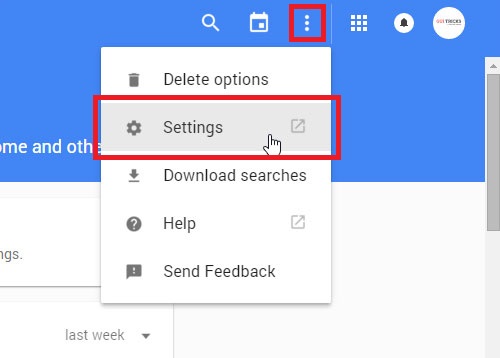
First of all, Login to your Google or Gmail account and go to the Web and App activity page. Here click on an icon at left of the top that looks like a gear icon. When you'll click on this icon, a drop down will appear. Here simply click on second Option 'Settings'.

How To Stop Google From Tracking You
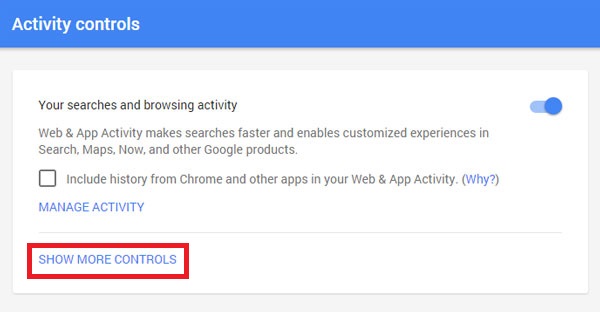
This action will open your account history settings. Here you can disable all search and browsing activity. For advance disabling, click on 'Show More Setting'

How To Stop Google From Tracking You
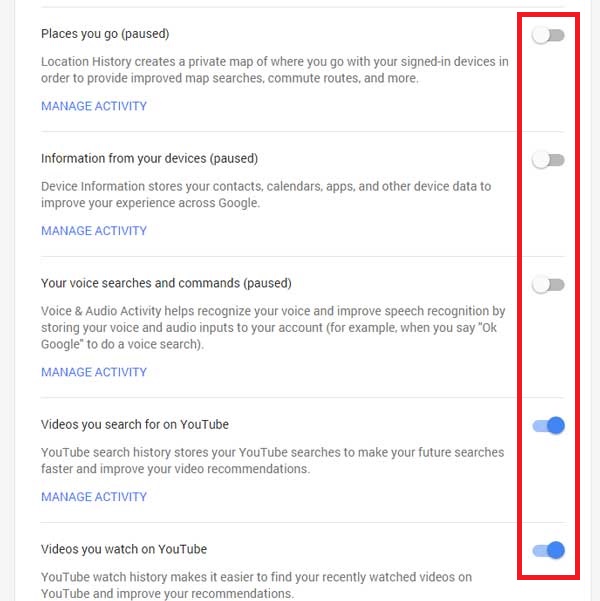
Here disable all advance options by disabling slide buttons at the right of every option.

How To Stop Google From Tracking You
Now you have done and feel free search everything about on Google. Google won't track your searches. That's it!

Conclusion

So this was a short helpful article for every internet user which covers on a tutorial about to disable Google from tracking. Actually, normally users consider tracking word in a negative way. But don't worry about that. Google tracking is not like that you're thinking about. In the first heading, I've told you why Google track. There's no any cleverness behind this issue. So don't panic, if you're thinking about your past searches.

Feel free leave your comment and give suggestions about this article. Share this too, if you think this article will be helpful for every internet user.