Is your graphics card or GPU not supporting the latest games anymore?
Are you facing lag while playing games?
Can you play games at medium, high, or ultra settings?
If you have such issues, the only solution is "
UPGRADE YOUR GRAPHICS CARD NOW!"
You can also overclock your graphics card by using
overclocking tools before buying a new GPU.
This article covers a freshly updated list of the 10 best budget graphics cards for 2026's PC gaming, current as of 2026. So if you're looking for the best budget graphics card without overspending, this article is for you.
Finding the best budget GPU for gaming is not just about picking the cheapest card. It's about getting the most performance per dollar. Whether you want a budget gaming GPU for smooth 1080p play or a budget video card that can stretch into 1440p, this updated list has an option for you.
Before diving into it, I've explained some basic misconceptions about graphics cards for newcomers. You can read this or skip this part.
What To Look For In The Best Budget Graphics Card For PC Gaming
When I bought my first graphics card, I didn't know what things are important in a GPU for gaming. I had a misconception that only video memory matters. Higher memory means better performance. But that's not true at all.
Video memory is not the only thing that matters in a graphics card. A graphics card also contains other things like memory speed, memory bus, memory type, memory bandwidth, L2 cache, core speed, boost clock, texture rate, ROPs, pixel rate, and pixel shaders. These are all important (and not for gaming only) for video editing, animation, and designing.
Okay, let's take a look at an example!
Normally, people think a 1GB graphics card is better than a 512MB GPU. That's not true. You can't measure the performance of a GPU just by knowing its video memory. You have to look at the other stuff too.
Let's compare a 512 MB model of Radeon HD 5670 with a 1GB model of Radeon HD 5450. The Radeon HD 5670 has 512 MB of video memory, and the Radeon HD 5450 has 1GB. But the HD 5670 works better than the HD 5450, not even twice. It works x4 faster than the HD 5450.
The reason is simple. The Radeon HD 5670 has a better memory speed, memory bus, memory type, memory bandwidth, L2 cache, core speed, boost clock, and texture rate than the HD 5450.
You can also check a detailed comparison of HD 5670 and HD 5450 at Game Debate.
Here's a detailed discussion about these components. Must read, if you're interested to know about them.
i. Core Clock Speed:
This is the actual speed at which the GPU operates. It is measured in MHz. You can also increase the core clock speed by using overclocking tools, up to a certain limit. For 2026 gaming, if you're looking for a GPU, try to find one with a high core clock so you won't face lag in modern titles. Today's budget cards typically run well above 2,000 MHz on boost, which is far higher than what older cards offered.
ii. Memory Bus:
The memory bus is the pathway your graphics card uses to reach its memory, and it is usually measured in bits (8 bits = 1 byte). It works together with the memory clock speed to determine how much memory can be accessed every second. A 64-bit to 128-bit bus was fine for older games, but modern, newly released games benefit from wider buses such as 128-bit, 192-bit, or 256-bit for smooth performance at higher resolutions.
iii. Memory Type:
The memory type is used for things such as storing the data needed to display an image on the screen, buffer data, and Z-coordinate data. While it won't directly affect performance on its own, it does matter when combined with the other memory specs. Most modern budget cards now use fast GDDR6 memory, which is a big step up from the older GDDR3 and GDDR5 found on outdated cards.
iv. Memory Bandwidth:
Memory bandwidth describes the speed at which the GPU can access its memory. Just as GPU processing power is a mix of the number of cores and the core speed, something similar applies to memory. How much memory can be accessed each second is a combination of the bus width and the memory data rate. This is why clock speed by itself doesn't tell you everything about the real memory access speed of a GPU.
v. Texture Rate:
To render a 3D scene, textures are mapped over the top of polygon meshes. This is called "texture mapping" and is handled by the Texture Mapping Units (TMUs) on the video card. The texture fill rate is a measure of how fast a card can perform texture mapping. Although pixel shader processing is becoming more important, this number still holds some weight.
10 Best Budget Graphics Cards For 2026's Gaming
Affiliate Disclosure: Some of the links in this post are affiliate links. This means that if you click on a link and make a purchase, we may receive a commission at no additional cost to you. We only recommend products and services that we believe in and have experience with. Your support in purchasing through these links enables us to keep producing high-quality content for our readers. Thank you for your support!
Here is the updated 2026 lineup of the 10 most affordable, budget-friendly graphics cards for PC gaming. Each one earns its spot as one of the best budget GPU picks for gaming this year. Check out the list below and grab the best one for you. Also, suggest more graphics cards in the comment section below:
1. ASRock Intel Arc B570 Challenger 10GB OC GDDR6


Quick Overview:
The Intel Arc B570 is the cheapest card on our list. It is built on Intel's Battlemage architecture (TSMC 5 nm) and comes with 10GB of GDDR6 on a 160-bit bus, which is capable of running games at medium-high settings on 1080p.
The card was launched in January 2025. It is a genuine entry-level budget option, and with Intel's XeSS upscaling it punches above its price.
The B570 requires a 500W power supply, which can be connected with an 8-pin connector.
Check out the quick specs:
- Video memory: 10GB
- Memory bus: 160 Bit
- Memory type: GDDR6
- Bandwidth: 380 GB/s
- Core speed: 2500 MHz (boost up to 2750 MHz)
- DirectX: 12 Ultimate supported
- Upscaling: Intel XeSS supported
- Maximum resolution: 8K supported
- Power Supply: 500 Watt required with an 8-pin connector
- Display outputs: 3x DisplayPort 2.1, 1x HDMI 2.1
You can get the Intel Arc B570 in the price range of $200-$240 on Amazon.
Overview:
The Intel Arc B570 is an entry-level card for budget gamers. The card was introduced in January 2025 and is built on Intel's Battlemage architecture, supporting DirectX 12 Ultimate. This confirms that the card can run all the modern games at 1080p.
So this is an entry-level GPU. But that doesn't mean it can't perform well. The Arc B570 is capable of handling games at medium-high settings, and Intel's drivers have improved a lot since launch.
If you have a smaller budget and still want solid 1080p performance with modern features like ray tracing and XeSS upscaling, then this card is a great choice for you.
2. ASUS Dual NVIDIA GeForce RTX™ 5050 8GB GDDR6

Quick Overview:
The RTX 5050 is built on Nvidia's Blackwell architecture and comes with 8GB of GDDR6, which is capable of delivering 60+ fps at 1080p in most of the games.
The card was launched in 2025 and supports DLSS 4 with multi-frame generation, which gives it a real edge in supported titles.
This card requires a 450W power supply that can be connected with an 8-pin connector.
Check out the quick specs:
- Video memory: 8GB
- Memory bus: 128 Bit
- Memory type: GDDR6
- Bandwidth: 320 GB/s
- Core speed: 2317 MHz (boost up to 2572 MHz)
- DirectX: 12 Ultimate supported
- Upscaling: DLSS 4 supported
- Maximum resolution: 8K supported
- Power Supply: 450 Watt required with an 8-pin connector
- Display outputs: 3x DisplayPort 2.1b, 1x HDMI 2.1b
You can find the RTX 5050 on Amazon in the price range of $220-$250.
Overview:
The RTX 5050 is an entry-level GPU by Nvidia. The card was launched in 2025 and has the power to handle modern games at 1080p.
The GPU is built on the Blackwell architecture and supports DirectX 12 Ultimate. This confirms that the RTX 5050 can handle the latest games smoothly on low-medium settings.
This card comes with 8GB of video memory paired with GDDR6 (enough for 1080p). The biggest advantage here is DLSS 4, which can boost frame rates significantly in supported titles.
As this is an entry-level graphics card, it doesn't mean the performance is low or incompatible with the latest games. With DLSS 4 turned on, the RTX 5050 is a capable 1080p performer.
3. ASRock Intel Arc B580 Challenger 12GB

Quick Specs:
The Intel Arc B580 is a mid-performance card built on Intel's Battlemage architecture. It comes with 12GB of GDDR6 on a 192-bit bus, which is capable of giving excellent FPS at 1080p and entry-level 1440p resolution.
The B580 was introduced in December 2024 and quickly became one of the best value cards in its price range, beating several older Nvidia and AMD cards thanks to its generous 12GB of VRAM.
This card requires a 500W PSU, which can be connected with an 8-pin connector.
Check out the quick specs:
- Video memory: 12GB
- Memory clock: 19 Gbps
- Memory bus: 192 Bit
- Memory type: GDDR6
- Bandwidth: 456 GB/s
- Core speed: 2670 MHz boost
- DirectX: 12 Ultimate supported
- Upscaling: Intel XeSS supported
- Maximum resolution: 8K supported
- Power Supply: 500 Watt required with an 8-pin connector
- Display outputs: 3x DisplayPort 2.1, 1x HDMI 2.1
You can get the Arc B580 in the price range of around $250 on Amazon.
Overview:
The Intel Arc B580 is a mid-performance graphics card designed by Intel. The card was launched in December 2024.
It gives very good frame rates at high settings on 1080p, and with its 12GB of VRAM it can also handle entry-level 1440p gaming, something rare at this price.
The Arc B580 is built on the Battlemage architecture and supports DirectX 12 Ultimate. This ensures that the card will run all the newly released games, including titles with ray tracing.
In this budget, this card offers a lot. With 12GB of memory and strong 1080p performance, I'd call it a true budget graphics card and one of the best budget video card picks of 2026.
4. ASUS Dual Radeon RX 7600 XT OC Edition 16GB GDDR6

Quick Specs:
The Radeon RX 7600 XT is a mid-performance card built on AMD's RDNA 3 architecture (6 nm). It comes with a large 16GB of GDDR6 on a 128-bit bus, which is capable of delivering strong FPS at 1080p and light 1440p gaming.
The RX 7600 XT was introduced in January 2024. Its standout feature is the big 16GB frame buffer, which keeps it relevant in modern, texture-heavy games.
This card requires a 500W power supply, which can be connected with an 8-pin connector.
Check out the quick specs:
- Video memory: 16GB
- Memory clock: 18 Gbps
- Memory bus: 128 Bit
- Memory type: GDDR6
- Bandwidth: 288 GB/s
- Core speed: 2470 MHz (boost up to 2755 MHz)
- DirectX: 12 Ultimate supported
- Upscaling: AMD FSR supported
- Maximum resolution: 8K supported
- Power Supply: 500 Watt required with an 8-pin connector
- Display outputs: 2x HDMI 2.1, 2x DisplayPort 2.1
You can get the RX 7600 XT in the price range of $300-$350 on Amazon.
Overview:
The Radeon RX 7600 XT is a mid-performance graphics card designed by AMD. The card was launched in January 2024.
It is capable of giving very good frame rates at high settings on 1080p, and it can exceed 150-190 FPS in many esports titles while staying stable in AAA games.
The RX 7600 XT is built on the 6 nm process and supports DirectX 12 Ultimate. This ensures the card will run all the newly released games.
Its 16GB of VRAM is the key selling point. While ray-tracing performance is limited compared to Nvidia, the large memory buffer makes this a smart, future-minded budget pick.
5. ASUS Dual AMD Radeon RX 9060 XT 8GB GDDR6

Quick Specs:
The Radeon RX 9060 XT 8GB is a mid-performance card built on AMD's latest RDNA 4 architecture (4 nm). It comes with 8GB of GDDR6 on a 128-bit bus and is capable of giving excellent FPS at 1080p.
The card was launched in 2025 and brings AMD's much-improved ray tracing and the new FSR 4 machine-learning upscaling to the budget segment.
This card requires a 450W PSU, which can be connected with an 8-pin connector.
Check out the quick specs:
- Video memory: 8GB
- Memory clock: 20 Gbps
- Memory bus: 128 Bit
- Memory type: GDDR6
- Bandwidth: 320 GB/s
- Core speed: 2530 MHz game clock (boost up to 3130 MHz)
- DirectX: 12 Ultimate supported
- Upscaling: AMD FSR 4 supported
- Maximum resolution: 8K supported
- Power Supply: 450 Watt required with an 8-pin connector
- Display outputs: 2x DisplayPort 2.1a, 1x HDMI 2.1b
You can get the RX 9060 XT 8GB in the price range of around $300 on Amazon.
Overview:
The Radeon RX 9060 XT 8GB is a mid-performance card on the RDNA 4 architecture, launched in 2025. The card is capable of giving good FPS at high settings on 1080p.
Because it uses the newest architecture, it benefits from much better ray tracing and AI performance than previous AMD budget cards, plus access to FSR 4 upscaling.
The card is built on the 4 nm process and supports DirectX 12 Ultimate. This ensures it will run all modern games.
The only thing to keep in mind is the 8GB of VRAM. For pure 1080p gaming it is fine, but if you can stretch your budget, the 16GB version (further down this list) is the smarter long-term buy.
6. ASUS Dual NVIDIA GeForce RTX™ 5060 8GB GDDR7

Quick Specs:
The Nvidia GeForce RTX 5060 is a mid-performance card built on the Blackwell architecture. It comes with 8GB of GDDR7 and is easily capable of delivering 60+ fps at 1080p in most games out there.
The card was launched in 2025 and is widely considered one of the best budget GPU for gaming picks in the mainstream Nvidia lineup, especially with DLSS 4 enabled.
This card requires a 450W power supply, which can be connected with an 8-pin connector.
Check out the quick specs:
- Video memory: 8GB
- Memory clock: 28 Gbps
- Memory bus: 128 Bit
- Memory type: GDDR7
- Bandwidth: 448 GB/s
- Core speed: 2280 MHz (boost up to 2497 MHz)
- DirectX: 12 Ultimate supported
- Upscaling: DLSS 4 supported
- Maximum resolution: 8K supported
- Power Supply: 450 Watt required with an 8-pin connector
- Display outputs: 3x DisplayPort 2.1b, 1x HDMI 2.1b
You can find the RTX 5060 on Amazon in the price range of $350-$370.
Overview:
The Nvidia RTX 5060 is a mid-performance card and one of the most popular budget choices in 2026. The card was launched in 2025.
It is built on the Blackwell architecture and supports DirectX 12 Ultimate. This confirms that the RTX 5060 can run all the latest games smoothly at 1080p.
The card is paired with 8GB of fast GDDR7 memory. While 8GB is on the lighter side for 2026, the RTX 5060 has impressive baseline 1080p performance, and DLSS 4 multi-frame generation gives it a big boost in supported games.
If you want to game at 1080p with strong ray-tracing and the latest Nvidia features, the RTX 5060 is still your best bet in this price range.
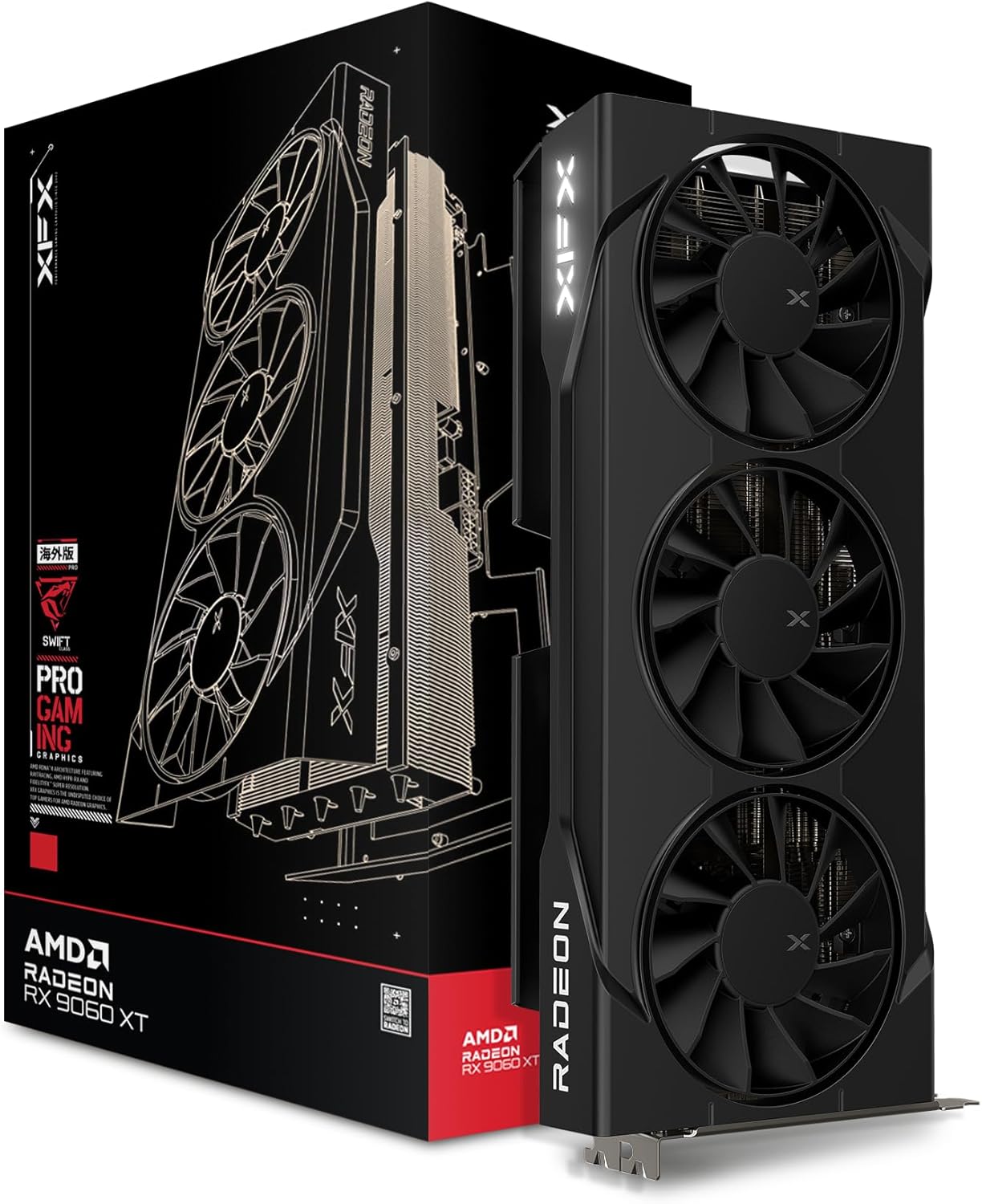
7. XFX Swift AMD Radeon RX 9060 XT OC 16GB GDDR6
Quick Specs:
The Radeon RX 9060 XT 16GB is the best value card on our list. It is built on AMD's RDNA 4 architecture (4 nm) and comes with a generous 16GB of GDDR6 on a 128-bit bus, which is capable of handling both 1080p and 1440p gaming comfortably.
The card was launched in 2025 with a starting MSRP of $349. With its 16GB frame buffer, it is the card you buy when you want to stop worrying about VRAM for the next few years.
This card requires a 450W PSU, which can be connected with an 8-pin connector.
Check out the quick specs:
- Video memory: 16GB
- Memory clock: 20 Gbps
- Memory bus: 128 Bit
- Memory type: GDDR6
- Bandwidth: 320 GB/s
- Core speed: 2530 MHz game clock (boost up to 3130 MHz)
- DirectX: 12 Ultimate supported
- Upscaling: AMD FSR 4 supported
- Maximum resolution: 8K supported
- Power Supply: 450 Watt required with an 8-pin connector
- Display outputs: 2x DisplayPort 2.1a, 1x HDMI 2.1b
You can get the RX 9060 XT 16GB in the price range of $350-$450 on Amazon.
Overview:
The Radeon RX 9060 XT 16GB is a mid-to-high performance graphics card designed by AMD and our top value pick for 2026. The card was launched in 2025.
It outperforms the older RTX 5060 by roughly 10-17% in rasterized gaming at both 1080p and 1440p, and its 16GB of VRAM means you will basically never find memory to be a bottleneck in modern games at these resolutions.
The card is built on the 4 nm process and supports DirectX 12 Ultimate. This means it supports hardware ray tracing, variable-rate shading, and AMD's FSR 4 machine-learning upscaling.
At $350 with 16GB of GDDR6, no current-generation competitor matches this combination of price, VRAM, and performance. If you have a budget of around $350-$400, this is the clearest budget win of 2026 and, for my money, the best budget gaming GPU you can buy right now.
8. ASUS Dual NVIDIA GeForce RTX 5060 Ti 16GB GDDR7

Quick Specs:
The Nvidia GeForce RTX 5060 Ti 16GB is a high-end budget card built on the Blackwell architecture. It comes with 16GB of GDDR7 on a 128-bit bus and is capable of delivering excellent FPS at 1080p and 1440p.
The card was launched in 2025 and sits at the sweet spot for 1440p gaming, benefiting heavily from DLSS 4 multi-frame generation.
This card requires a 500W PSU, which can be connected with an 8-pin connector.
Check out the quick specs:
- Video memory: 16GB
- Memory clock: 28 Gbps
- Memory bus: 128 Bit
- Memory type: GDDR7
- Bandwidth: 448 GB/s
- Core speed: 2407 MHz (boost up to 2572 MHz)
- DirectX: 12 Ultimate supported
- Upscaling: DLSS 4 supported
- Maximum resolution: 8K supported
- Power Supply: 500 Watt required with an 8-pin connector
- Display outputs: 3x DisplayPort 2.1b, 1x HDMI 2.1b
You can get the RTX 5060 Ti 16GB on Amazon in the price range of around $450.
Overview:
The Nvidia GeForce RTX 5060 Ti 16GB is a performance card launched in 2025. The card provides excellent FPS at high and ultra settings on 1080p and 1440p.
It is built on the Blackwell architecture and supports DirectX 12 Ultimate, which guarantees that the card is powerful enough to play modern games with ray tracing enabled.
The RTX 5060 Ti is paired with 16GB of fast GDDR7. The 16GB version is the one to buy, the 8GB variant exists but is not recommended, because spending this much and then running out of VRAM makes no sense in 2026.
With DLSS 4 multi-frame generation, this card can reach very high frame rates at 1440p. If your budget stretches to around $450, the RTX 5060 Ti 16GB is an excellent 1440p performer.
9. GIGABYTE Radeon RX 7700 XT Gaming OC 12GB

Quick Specs:
The Radeon RX 7700 XT is a high-performance card built on AMD's RDNA 3 architecture (5 nm). It comes with 12GB of GDDR6 on a 192-bit bus, which is capable of giving great frame rates at 1080p and 1440p.
The card was introduced in September 2023 and remains a strong 1440p value option, often available at discounted prices in 2026.
This card requires a 600W power supply, which can be connected with two 8-pin connectors.
Check out the quick specs:
- Video memory: 12GB
- Memory clock: 18 Gbps
- Memory bus: 192 Bit
- Memory type: GDDR6
- Bandwidth: 432 GB/s
- Core speed: 2171 MHz (boost up to 2544 MHz)
- DirectX: 12 Ultimate supported
- Upscaling: AMD FSR supported
- Maximum resolution: 8K supported
- Power Supply: 600 Watt required with two 8-pin connectors
- Display outputs: 1x HDMI 2.1, 3x DisplayPort 2.1
You can get the RX 7700 XT in the price range of $380-$430 on Amazon.
Overview:
The Radeon RX 7700 XT is a high-performance card designed by AMD. The card was launched in September 2023.
It is a performance card for 1440p gamers, so you can easily get decent frame rates at high or ultra settings on 1080p and 1440p.
The card is built on the 5 nm process and supports DirectX 12 Ultimate. This is confirmation that this card can handle newly released games easily.
With 12GB of VRAM and a wide 192-bit bus, the RX 7700 XT has the bandwidth and memory to run modern games well. If it drops into your budget at a discount, it is a strong 1440p upgrade.
10. GIGABYTE GeForce RTX 5070 WINDFORCE OC 12GB

Quick Specs:
The Nvidia GeForce RTX 5070 is a performance card built on the Blackwell architecture. It comes with 12GB of GDDR7 on a 192-bit bus and supports DirectX 12 Ultimate, which means it can run all modern games with ease.
The card was launched in 2025 and sits at the top of our budget list as a true 1440p performer with the full DLSS 4 feature set.
The RTX 5070 requires a 650W power supply, which can be connected with a 12-pin connector.
Check out the quick specs:
- Video memory: 12GB
- Memory clock: 28 Gbps
- Memory bus: 192 Bit
- Memory type: GDDR7
- Bandwidth: 672 GB/s
- Core speed: 2160 MHz (boost up to 2512 MHz)
- DirectX: 12 Ultimate supported
- Upscaling: DLSS 4 supported
- Maximum resolution: 8K supported
- Power Supply: 650 Watt required with a 12-pin connector
- Display outputs: 3x DisplayPort 2.1b, 1x HDMI 2.1b
You can get the RTX 5070 in the price range of around $550 on Amazon.
Overview:
The Nvidia GeForce RTX 5070 is a high-end performance graphics card designed by Nvidia. The card was launched in 2025.
The RTX 5070 is not an entry-level or mid-performance card. It was built to perform at high or ultra settings, so a gamer can get the full joy of gaming at 1440p.
This card is capable of giving excellent frame rates at high and ultra settings on 1080p and 1440p, and it can even step into entry-level 4K with DLSS 4 enabled.
The RTX 5070 is built on the Blackwell architecture and supports DirectX 12 Ultimate. This ensures support for hardware ray tracing, variable-rate shading, and DLSS 4 multi-frame generation in upcoming games.
This card comes with 12GB of GDDR7 and a fast 192-bit bus. If you have a budget of around $550 and want the most powerful card on this list, the RTX 5070 is the one to get.
Tips To Consider While Buying The Best Budget Graphics Card
Now let's discuss a few important things before purchasing a budget GPU for gaming.
I've seen many people who don't consider these things (that I will discuss). After that, they face different issues.
Purchasing a GPU is more complex than you think. You have to consider many things, which I'm going to discuss below. Please read the discussion below to avoid any problems.
1. Power Supply (PSU) Is Important
A power supply is one of the most important components when adding a graphics card, and not for the graphics card only. It is important for the other components of the PC too.
All graphics cards have different specifications. They require a specific amount of power to run. So, before finalizing your deal with a graphics card dealer, make sure your power supply has enough wattage capacity to run the card.
A modern budget graphics card typically requires a 450W-650W PSU, connected with an 8-pin or 12-pin power connector. You can upgrade your PSU if you already have one up to 600W and have no plans to upgrade the rest of your PC. Because if you go for a high-end CPU, an RTX-series card, and so on, you'll have to upgrade your whole system.
One more thing you should consider while purchasing a graphics card is the power connector type. Newer cards may use a 12VHPWR (12-pin) connector, so make sure your PSU supports it or comes with the right adapter.
2. Size Of Graphics Card
This is the second tip for you. Make sure your graphics card size is compatible with your casing. I have had an experience with this. A few years back, I bought a GTX 970 with triple fans. The GPU had a cool design, but I could not fit it into my PC.
It was a big GPU. When I tried to insert it into the casing, the extra third fan created a problem.
So, make sure to check the card's length against your case before buying. Many modern budget cards come in compact dual-fan designs that fit most cases, but always confirm the clearance.
3. Cooling System
Usually, budget graphics cards do not come with the best cooling system. They are not always efficient at maintaining a normal temperature. And if you try to overclock them, it can become risky for a budget GPU.
So, what should you do in this case?
There are a few things you have to be careful about.
The first thing is to make sure the room where you're going to use your PC stays at a normal temperature, and that the location where you set up your computer has enough air ventilation.
Secondly, make sure your casing's cooling fans are working properly.
Extra tip: While gaming or rendering, it is better to remove the side panel of the casing if your PC doesn't have a good cooling system.
4. Avoid Mined Graphics Cards
While searching for budget graphics cards, you might have seen cheap GPUs that are priced very low compared to the market. Why?
There is a chance that those GPUs have been used for mining. Although GPU mining is far less common now than it was a few years ago, used and mined cards still circulate in the second-hand market, so it's worth being careful.
Once a GPU has been used heavily for mining, its life can deteriorate. The graphics card may already be worn down and should only be trusted to work for a short time.
So the question that should come to your mind is: how would you analyze and check whether a GPU has been mined or not?
I always recommend two steps to check:
The first one is to analyze the board and check the PCB closely. If you find any discoloration on it, that can signify that the card has been used for mining purposes.
What if you don't find discoloration? You can follow the second step.
The second step is to run a stress test on the card. You can use "FurMark" for this.
This software pushes the card to perform at 100%. While testing, analyze the graphics card's temperature, performance, and fans. If all these things are stable while testing, then the card is most likely fine and has not been abused by mining.
FAQs (Frequently Asked Questions)
I receive some commonly asked questions related to graphics cards in my inbox, emails, and so on. So, I should discuss these questions in this article too.
Which One Is Better? Nvidia or AMD?
This is the most asked question. If you're familiar with the graphics card industry, then you've heard both names.
Nvidia and AMD both manufacture GPUs. Both are reliable companies. A few years back, Nvidia had the best-performing graphics cards and was almost everyone's favorite.
But right now, AMD is also excellent and gives tough competition to Nvidia. With RDNA 4 cards like the RX 9060 XT, AMD often wins on value and VRAM.
Both companies are strong in hardware technology. Nvidia keeps its users up to date with frequent drivers and features like DLSS 4. AMD counters with FSR 4 and usually more VRAM for the money.
If you want the best ray-tracing and upscaling features, Nvidia is a great choice. But if you want the most performance and VRAM per dollar, AMD is often the winner.
Does AMD Run Hot?
No, AMD doesn't run unusually hot now. There was a time when users used to complain about heating issues. But AMD has improved a lot. Their modern GPUs run efficiently, and the latest RDNA 4 cards are known for excellent performance per watt.
Is Intel Arc Good For Gaming?
Yes, this has changed a lot. Intel's Arc B-series (Battlemage) cards like the B580 and B570 are now among the best value budget GPUs for 1080p gaming, with strong drivers and good ray-tracing support. Intel integrated HD graphics, on the other hand, is still only fine for light or older games, not modern AAA titles.
Is AMD Good For Rendering Purposes?
Yes. Many users recommend AMD if you want to use your PC for both gaming and video editing, thanks to the large VRAM on modern AMD cards. That said, Nvidia also has an edge in some creative apps due to CUDA and strong driver support. For a pure gaming-plus-rendering machine on a budget, a high-VRAM AMD card is a great choice.
How Much Would A Budget Graphics Card Cost In 2026?
A budget graphics card in 2026 would cost you somewhere between $200 and $550. If you spend much more than that, you're no longer shopping for a budget GPU.
There are many good options in this range, as you can see in our best budget GPU list above.
One more thing: it's best not to go below around $200 for a new card. The cheapest new GPUs under that price are not great for modern gaming. Note that GPU prices in 2026 have been inflated by high AI-driven demand, so always check live prices before buying, especially since this list reflects 2026 pricing.
8GB Vs. 16GB
While choosing a graphics card, more memory is generally better, but VRAM alone doesn't decide whether a GPU is good. There are other components to compare too.
That said, the VRAM conversation has moved on. In 2026, the real question is 8GB vs 12GB vs 16GB, not the old 2GB vs 4GB debate. Modern games are demanding more memory, so 8GB is now the bare minimum for 1080p, while 12GB-16GB is recommended for 1440p and for keeping your card relevant for the next few years.
Single Fan Vs. Dual Or Triple Fans
GPUs that are OC (overclocked) editions usually have dual or triple fans for better cooling. Because OC editions boost higher while gaming, they need extra cooling so the card stays cool even in summer.
But what about single-fan GPUs?
You can still find single-fan GPUs in the budget and compact range. These are usually lower-power cards that aren't designed for heavy overclocking. The advantage of a single-fan graphics card is that it is power-efficient and takes up less space, so it fits in almost every casing, including small-form-factor builds.
Wrapping Up!
This article contains the updated 2026 GPU list along with a complete guide and tips for purchasing a card, so that you can avoid any problems while and after buying it. Whichever you pick, every card here is a solid best budget GPU for gaming choice this year.
Feel free to comment below if I should include any other budget gaming GPU options. Your suggestions will be considered.
Also, share your review regarding this article. Your support will encourage me to create more content like this.
One last reminder: GPU prices and stock change constantly, so always check the latest price on Amazon before buying, especially in 2026, when AI demand has pushed prices around a lot. This list is current as of 2026.
Thanks for reading my article.
Sharing is caring..
Don't forget to check more interesting articles:


 Price: $39.99 (down from $69.99) Connection: Wired 3.5mm
 Price: $59.99 Connection: Wired 3.5mm
 Price: $59.99 Connection: Wireless
 Price: $29.99 (down from $59.99) Connection: Wired 3.5mm
 Price: $27.99 (some versions drop to $17.99) Connection: Wired 3.5mm


 Web design and development continues to evolve in 2025 too. The rise of AI in literally almost every digital field has brought havoc, from AI content generation to AI-assisted designing. And you know what? The web design typography trends have also not been able to stay safe from it.