

Why spend a lot of money on a gaming headset that costs $150 when you can get something for $75?
You do not need to spend that money just to hear the footsteps of other players sneaking up behind you, talk clearly with your friends who are playing with you, or play games for five hours without your ears hurting.
The good news is that you do not have to choose between the quality of a gaming headset and the amount of money you have to spend.
Below are five gaming headsets that have everything you need, whether you want a wired gaming headset for clear sound, a wireless gaming headset so you can move around, or a reliable option for talking to your team during competitions.
They are also simple enough to use if this is your first real gaming headset. If you are purchasing for a gaming center, esports team, or larger group, you can also buy bulk gaming headsets to equip multiple players while keeping costs under control.
Even the most expensive gaming headset on this list is not so costly that you cannot afford to buy something else, such as a mousepad or a controller grip, after your purchase.
Here is what each gaming headset actually costs, what it is good at and what it is not so good at.
Quick Comparison
| Headset | Price | Connection | Best For |
|---|---|---|---|
| Corsair HS65 Surround | $39.99 | Wired 3.5mm | Long PC sessions |
| Razer BlackShark V2 X | $59.99 | Wired 3.5mm | Competitive shooters |
| Logitech G321 LIGHTSPEED | $59.99 | Wireless | Cable-free desks |
| Logitech ASTRO A10 | $29.99 | Wired 3.5mm | First-time buyers |
| Turtle Beach Airlite Fit | $27.99 | Wired 3.5mm | Lowest cost per seat |
Affiliate Disclosure: This post contains affiliate links. If you click on one and make a purchase, we may earn a small commission at no extra cost to you. We only recommend products we have personally researched, and that we genuinely believe offer good value. Your support through these links helps us continue creating honest, well-researched content for our readers. Thank you for being here.
1. Corsair HS65 Surround
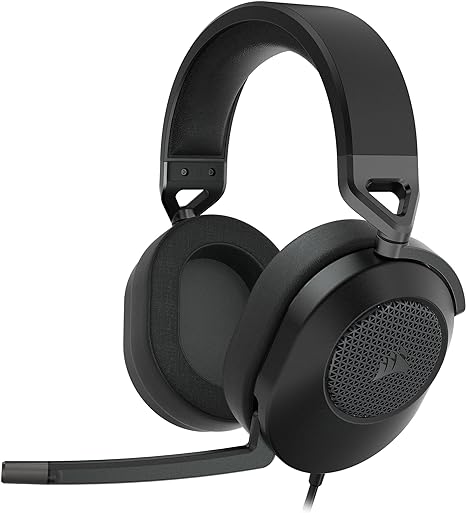 Price: $39.99 (down from $69.99) Connection: Wired 3.5mm
Corsair built this one around comfort and detail rather than features you will never touch. It is one of the best gaming headsets that feels like a $70 headset because it was one until recently.
What you get
- 50mm neodymium drivers that pull real detail out of immersive gaming audio
- Memory foam leatherette ear cushions that seal without squeezing
- The aluminum-reinforced frame is really good at holding its shape on a desk
- Dolby Audio 7.1 support on PC and Mac
- SoundID personalization through Corsair's software
- The 7.1 processing only pays off when your software supports it
- A cable ties you to the machine, so plan your seating
- You play three-hour stretches and want cushions that keep up
- You hate charging accessories
- You listen to music and watch films in the same headset
2. Razer BlackShark V2 X
 Price: $59.99 Connection: Wired 3.5mm
Razer chased weight and voice clarity here. At 240 grams, this budget gaming headset all but vanishes during a long ranked session, and the mic stays locked on your voice.
What you get
- TriForce 50mm drivers that split the audio range into separate zones
- 240-gram frame, light enough to forget you are wearing it
- HyperClear cardioid microphone tuned for team comms
- Simple 3.5mm cable that moves between PC, console, and handheld
- No wireless option, so the cable comes with you everywhere
- The tuning favors clarity over thumping bass
- Callouts and positional audio decide your matches
- You bounce between platforms and want one cable to rule them all
- Heavy headsets give you a headache
3. Logitech G321 LIGHTSPEED
 Price: $59.99 Connection: Wireless
Wireless usually adds $40 to the sticker price because batteries, radios, and charging circuits cost money. The G321 lands at $59.99 and is the top choice among gaming headsets under $75.
What you get
- LIGHTSPEED wireless, built for low latency rather than Bluetooth lag
- Freedom to lean back, stand up, or grab a drink mid-lobby
- A desk with one less cable running across it
- Everyday tuning that suits a mixed game library
- You have to track battery life and remember to charge it
- Tournament-grade features live further up the price ladder
- Cables genuinely annoy you
- You move around while you play
- You already run Logitech peripherals
4. Logitech ASTRO A10
 Price: $29.99 (down from $59.99) Connection: Wired 3.5mm
The first-generation ASTRO A10 skips the extras and nails the basics of a cheap gaming headset. No pairing menu, no charging cable, no software profile to configure.
What you get
- Plug-and-play 3.5mm connection
- Broad platform support, depending on your device and adapter
- Durable, no-nonsense build at half its launch price
- Zero setup time between unboxing and playing
- It will not match high-end headsets on detail or soundstage
- No software tuning or surround processing
- You are buying your first headset
- You are kitting out a second station and $150 makes no sense
- You want something a teenager can use without a manual
5. Turtle Beach Airlite Fit
 Price: $27.99 (some versions drop to $17.99) Connection: Wired 3.5mm
Turtle Beach aimed this one squarely at casual play and second seats. The affordable gaming headset handles voice chat and game audio well, and it costs less than most new releases.
What you get
- 40mm speakers tuned for everyday gaming
- Sound-isolating cushions that block room noise
- Bi-directional microphone for clear voice chat
- Lightweight build that suits smaller heads
- A Nintendo-licensed Switch 2 version at the same $27.99
- The feature list stops at the essentials
- Build quality reflects the price, so treat it gently
- You need three headsets for a household
- You want a spare near the console or for guests
- Your kids play more than you do
Wired or Wireless: Pick Based on How You Play
Neither connection sounds better on its own. Drivers, tuning, mic quality, and fit decide that.Go wired gaming headphones if
- You play long sessions and hate charging things
- Your PC or console sits within arm's reach
- You want the most sound per dollar
- Simplicity beats freedom for you
- You pace, stretch, or wander mid-match
- Cables clutter your desk and bother you
- You switch between gaming and other tasks constantly
- A clean setup matters to you
How to Spot Premium Sound Quality at a Budget Price
Spec sheets mislead people. Bigger drivers do not guarantee better sound, a wider frequency range does not promise more detail, and a badly implemented virtual surround mode sounds worse than clean stereo.Chase Balance Over Bass
Heavy bass thrills you during an explosion and buries footsteps during a firefight. The best budget gaming headset keeps every sound recognizable.
Put Comfort Ahead of Features
Soft cushions, a light clamp, and low weight beat any bonus feature on the box. An uncomfortable headset gets abandoned no matter how good it sounds.
Test the Mic Before You Trust It
Teammates hear your positioning first and your audio quality second. Check placement too, since a great capsule in the wrong spot still muffles your voice.
Match the Connector to Your Gear
- PC players: USB controls and software support add real value
- Console players: a straight 3.5mm cable usually covers everything
- Wireless buyers: confirm the receiver supports your platform before you order
Headset or Headphones Plus a Separate Mic?
Some players pair regular headphones with a standalone crystal clear microphone, and that setup works well.Headphones plus a mic give you:
- Stronger music performance
- A wider choice of sound signatures
- Room to upgrade each piece separately
- One cable and one device to manage
- Volume and mute controls on the earcup
- A lower total cost
Buying in Bulk for a Team or Classroom
Gaming centers, schools, esports clubs, and PC builders can buy bulk gaming headsets.- Standardize the model. One setup for staff to learn, one control layout for users.
- Check warranty terms first. A $30 headset stops feeling cheap when five fail the same month.
- Confirm stock availability. Replacements need to match what you already deployed.
- Weigh durability over specs. Headbands and cables fail long before drivers do.
How Much Should You Actually Spend on Gaming Speakers?
A $75 ceiling gives you room to breathe, and you do not have to use all of it.- Around $28: the Airlite Fit covers voice chat and game audio, and leaves $47 for something else
- Around $30: the ASTRO A10 handles the fundamentals with zero fuss
- Around $40: the Corsair HS65 hits the sweet spot on comfort and detail
- Around $60: the BlackShark V2 X and G321 add real features and still stay under the limit
In Conclusion
Five headsets, five different routes to good value:- Corsair HS65 Surround ($39.99) is the comfort PC gaming headset
- Razer BlackShark V2 X ($59.99) is light, clear, and built for callouts
- Logitech G321 LIGHTSPEED ($59.99) is the perfect headset and gives you real wireless freedom under $60
- Logitech ASTRO A10 ($29.99) is popular because of its simplicity, which works out of the box
- Turtle Beach Airlite Fit ($27.99) is the cheapest way to get everyone playing
0 comments:
Post a Comment