Showing posts with label Reviews. Show all posts

10 Best Budget Graphics Cards For PC Gaming in 2026

Best Budget Graphics Cards 2026
Is your graphics card or GPU not supporting the latest games anymore?

Are you facing lag while playing games?

Can you play games at medium, high, or ultra settings?

If you have such issues, the only solution is "UPGRADE YOUR GRAPHICS CARD NOW!"

You can also overclock your graphics card by using overclocking tools before buying a new GPU.

This article covers a freshly updated list of the 10 best budget graphics cards for 2026's PC gaming, current as of  2026. So if you're looking for the best budget graphics card without overspending, this article is for you.

Finding the best budget GPU for gaming is not just about picking the cheapest card. It's about getting the most performance per dollar. Whether you want a budget gaming GPU for smooth 1080p play or a budget video card that can stretch into 1440p, this updated list has an option for you.

Before diving into it, I've explained some basic misconceptions about graphics cards for newcomers. You can read this or skip this part.

What To Look For In The Best Budget Graphics Card For PC Gaming

When I bought my first graphics card, I didn't know what things are important in a GPU for gaming. I had a misconception that only video memory matters. Higher memory means better performance. But that's not true at all.

Video memory is not the only thing that matters in a graphics card. A graphics card also contains other things like memory speed, memory bus, memory type, memory bandwidth, L2 cache, core speed, boost clock, texture rate, ROPs, pixel rate, and pixel shaders. These are all important (and not for gaming only) for video editing, animation, and designing.

Okay, let's take a look at an example!

Normally, people think a 1GB graphics card is better than a 512MB GPU. That's not true. You can't measure the performance of a GPU just by knowing its video memory. You have to look at the other stuff too.

Let's compare a 512 MB model of Radeon HD 5670 with a 1GB model of Radeon HD 5450. The Radeon HD 5670 has 512 MB of video memory, and the Radeon HD 5450 has 1GB. But the HD 5670 works better than the HD 5450, not even twice. It works x4 faster than the HD 5450.

The reason is simple. The Radeon HD 5670 has a better memory speed, memory bus, memory type, memory bandwidth, L2 cache, core speed, boost clock, and texture rate than the HD 5450.

You can also check a detailed comparison of HD 5670 and HD 5450 at Game Debate.

Here's a detailed discussion about these components. Must read, if you're interested to know about them.

i. Core Clock Speed:

This is the actual speed at which the GPU operates. It is measured in MHz. You can also increase the core clock speed by using overclocking tools, up to a certain limit. For 2026 gaming, if you're looking for a GPU, try to find one with a high core clock so you won't face lag in modern titles. Today's budget cards typically run well above 2,000 MHz on boost, which is far higher than what older cards offered.

ii. Memory Bus:

The memory bus is the pathway your graphics card uses to reach its memory, and it is usually measured in bits (8 bits = 1 byte). It works together with the memory clock speed to determine how much memory can be accessed every second. A 64-bit to 128-bit bus was fine for older games, but modern, newly released games benefit from wider buses such as 128-bit, 192-bit, or 256-bit for smooth performance at higher resolutions.

iii. Memory Type:

The memory type is used for things such as storing the data needed to display an image on the screen, buffer data, and Z-coordinate data. While it won't directly affect performance on its own, it does matter when combined with the other memory specs. Most modern budget cards now use fast GDDR6 memory, which is a big step up from the older GDDR3 and GDDR5 found on outdated cards.

iv. Memory Bandwidth:

Memory bandwidth describes the speed at which the GPU can access its memory. Just as GPU processing power is a mix of the number of cores and the core speed, something similar applies to memory. How much memory can be accessed each second is a combination of the bus width and the memory data rate. This is why clock speed by itself doesn't tell you everything about the real memory access speed of a GPU.

v. Texture Rate:

To render a 3D scene, textures are mapped over the top of polygon meshes. This is called "texture mapping" and is handled by the Texture Mapping Units (TMUs) on the video card. The texture fill rate is a measure of how fast a card can perform texture mapping. Although pixel shader processing is becoming more important, this number still holds some weight.

10 Best Budget Graphics Cards For 2026's Gaming

Affiliate Disclosure: Some of the links in this post are affiliate links. This means that if you click on a link and make a purchase, we may receive a commission at no additional cost to you. We only recommend products and services that we believe in and have experience with. Your support in purchasing through these links enables us to keep producing high-quality content for our readers. Thank you for your support!
Here is the updated 2026 lineup of the 10 most affordable, budget-friendly graphics cards for PC gaming. Each one earns its spot as one of the best budget GPU picks for gaming this year. Check out the list below and grab the best one for you. Also, suggest more graphics cards in the comment section below:

1. ASRock Intel Arc B570 Challenger 10GB OC GDDR6

Best Budget Graphics Cards Buy Now

Quick Overview:

The Intel Arc B570 is the cheapest card on our list. It is built on Intel's Battlemage architecture (TSMC 5 nm) and comes with 10GB of GDDR6 on a 160-bit bus, which is capable of running games at medium-high settings on 1080p.

The card was launched in January 2025. It is a genuine entry-level budget option, and with Intel's XeSS upscaling it punches above its price.

The B570 requires a 500W power supply, which can be connected with an 8-pin connector.

Check out the quick specs:
  • Video memory: 10GB
  • Memory bus: 160 Bit
  • Memory type: GDDR6
  • Bandwidth: 380 GB/s
  • Core speed: 2500 MHz (boost up to 2750 MHz)
  • DirectX: 12 Ultimate supported
  • Upscaling: Intel XeSS supported
  • Maximum resolution: 8K supported
  • Power Supply: 500 Watt required with an 8-pin connector
  • Display outputs: 3x DisplayPort 2.1, 1x HDMI 2.1

You can get the Intel Arc B570 in the price range of $200-$240 on Amazon.

Overview:

The Intel Arc B570 is an entry-level card for budget gamers. The card was introduced in January 2025 and is built on Intel's Battlemage architecture, supporting DirectX 12 Ultimate. This confirms that the card can run all the modern games at 1080p.

So this is an entry-level GPU. But that doesn't mean it can't perform well. The Arc B570 is capable of handling games at medium-high settings, and Intel's drivers have improved a lot since launch.

If you have a smaller budget and still want solid 1080p performance with modern features like ray tracing and XeSS upscaling, then this card is a great choice for you.

2. ASUS Dual NVIDIA GeForce RTX™ 5050 8GB GDDR6

Best Budget Graphics Cards Buy Now

Quick Overview:

The RTX 5050 is built on Nvidia's Blackwell architecture and comes with 8GB of GDDR6, which is capable of delivering 60+ fps at 1080p in most of the games.

The card was launched in 2025 and supports DLSS 4 with multi-frame generation, which gives it a real edge in supported titles.

This card requires a 450W power supply that can be connected with an 8-pin connector.

Check out the quick specs:
  • Video memory: 8GB
  • Memory bus: 128 Bit
  • Memory type: GDDR6
  • Bandwidth: 320 GB/s
  • Core speed: 2317 MHz (boost up to 2572 MHz)
  • DirectX: 12 Ultimate supported
  • Upscaling: DLSS 4 supported
  • Maximum resolution: 8K supported
  • Power Supply: 450 Watt required with an 8-pin connector
  • Display outputs: 3x DisplayPort 2.1b, 1x HDMI 2.1b

You can find the RTX 5050 on Amazon in the price range of $220-$250.

Overview:

The RTX 5050 is an entry-level GPU by Nvidia. The card was launched in 2025 and has the power to handle modern games at 1080p.

The GPU is built on the Blackwell architecture and supports DirectX 12 Ultimate. This confirms that the RTX 5050 can handle the latest games smoothly on low-medium settings.

This card comes with 8GB of video memory paired with GDDR6 (enough for 1080p). The biggest advantage here is DLSS 4, which can boost frame rates significantly in supported titles.

As this is an entry-level graphics card, it doesn't mean the performance is low or incompatible with the latest games. With DLSS 4 turned on, the RTX 5050 is a capable 1080p performer.

3. ASRock Intel Arc B580 Challenger 12GB

Best Budget Graphics Cards Buy Now

Quick Specs:

The Intel Arc B580 is a mid-performance card built on Intel's Battlemage architecture. It comes with 12GB of GDDR6 on a 192-bit bus, which is capable of giving excellent FPS at 1080p and entry-level 1440p resolution.

The B580 was introduced in December 2024 and quickly became one of the best value cards in its price range, beating several older Nvidia and AMD cards thanks to its generous 12GB of VRAM.

This card requires a 500W PSU, which can be connected with an 8-pin connector.

Check out the quick specs:
  • Video memory: 12GB
  • Memory clock: 19 Gbps
  • Memory bus: 192 Bit
  • Memory type: GDDR6
  • Bandwidth: 456 GB/s
  • Core speed: 2670 MHz boost
  • DirectX: 12 Ultimate supported
  • Upscaling: Intel XeSS supported
  • Maximum resolution: 8K supported
  • Power Supply: 500 Watt required with an 8-pin connector
  • Display outputs: 3x DisplayPort 2.1, 1x HDMI 2.1

You can get the Arc B580 in the price range of around $250 on Amazon.

Overview:

The Intel Arc B580 is a mid-performance graphics card designed by Intel. The card was launched in December 2024.

It gives very good frame rates at high settings on 1080p, and with its 12GB of VRAM it can also handle entry-level 1440p gaming, something rare at this price.

The Arc B580 is built on the Battlemage architecture and supports DirectX 12 Ultimate. This ensures that the card will run all the newly released games, including titles with ray tracing.

In this budget, this card offers a lot. With 12GB of memory and strong 1080p performance, I'd call it a true budget graphics card and one of the best budget video card picks of 2026.

4. ASUS Dual Radeon RX 7600 XT OC Edition 16GB GDDR6

Best Budget Graphics Cards Buy Now

Quick Specs:

The Radeon RX 7600 XT is a mid-performance card built on AMD's RDNA 3 architecture (6 nm). It comes with a large 16GB of GDDR6 on a 128-bit bus, which is capable of delivering strong FPS at 1080p and light 1440p gaming.

The RX 7600 XT was introduced in January 2024. Its standout feature is the big 16GB frame buffer, which keeps it relevant in modern, texture-heavy games.

This card requires a 500W power supply, which can be connected with an 8-pin connector.

Check out the quick specs:
  • Video memory: 16GB
  • Memory clock: 18 Gbps
  • Memory bus: 128 Bit
  • Memory type: GDDR6
  • Bandwidth: 288 GB/s
  • Core speed: 2470 MHz (boost up to 2755 MHz)
  • DirectX: 12 Ultimate supported
  • Upscaling: AMD FSR supported
  • Maximum resolution: 8K supported
  • Power Supply: 500 Watt required with an 8-pin connector
  • Display outputs: 2x HDMI 2.1, 2x DisplayPort 2.1

You can get the RX 7600 XT in the price range of $300-$350 on Amazon.

Overview:

The Radeon RX 7600 XT is a mid-performance graphics card designed by AMD. The card was launched in January 2024.

It is capable of giving very good frame rates at high settings on 1080p, and it can exceed 150-190 FPS in many esports titles while staying stable in AAA games.

The RX 7600 XT is built on the 6 nm process and supports DirectX 12 Ultimate. This ensures the card will run all the newly released games.

Its 16GB of VRAM is the key selling point. While ray-tracing performance is limited compared to Nvidia, the large memory buffer makes this a smart, future-minded budget pick.

5. ASUS Dual AMD Radeon RX 9060 XT 8GB GDDR6

Best Budget Graphics Cards Buy Now

Quick Specs:

The Radeon RX 9060 XT 8GB is a mid-performance card built on AMD's latest RDNA 4 architecture (4 nm). It comes with 8GB of GDDR6 on a 128-bit bus and is capable of giving excellent FPS at 1080p.

The card was launched in 2025 and brings AMD's much-improved ray tracing and the new FSR 4 machine-learning upscaling to the budget segment.

This card requires a 450W PSU, which can be connected with an 8-pin connector.

Check out the quick specs:
  • Video memory: 8GB
  • Memory clock: 20 Gbps
  • Memory bus: 128 Bit
  • Memory type: GDDR6
  • Bandwidth: 320 GB/s
  • Core speed: 2530 MHz game clock (boost up to 3130 MHz)
  • DirectX: 12 Ultimate supported
  • Upscaling: AMD FSR 4 supported
  • Maximum resolution: 8K supported
  • Power Supply: 450 Watt required with an 8-pin connector
  • Display outputs: 2x DisplayPort 2.1a, 1x HDMI 2.1b

You can get the RX 9060 XT 8GB in the price range of around $300 on Amazon.

Overview:

The Radeon RX 9060 XT 8GB is a mid-performance card on the RDNA 4 architecture, launched in 2025. The card is capable of giving good FPS at high settings on 1080p.

Because it uses the newest architecture, it benefits from much better ray tracing and AI performance than previous AMD budget cards, plus access to FSR 4 upscaling.

The card is built on the 4 nm process and supports DirectX 12 Ultimate. This ensures it will run all modern games.

The only thing to keep in mind is the 8GB of VRAM. For pure 1080p gaming it is fine, but if you can stretch your budget, the 16GB version (further down this list) is the smarter long-term buy.

6. ASUS Dual NVIDIA GeForce RTX™ 5060 8GB GDDR7

Best Budget Graphics Cards Buy Now

Quick Specs:

The Nvidia GeForce RTX 5060 is a mid-performance card built on the Blackwell architecture. It comes with 8GB of GDDR7 and is easily capable of delivering 60+ fps at 1080p in most games out there.

The card was launched in 2025 and is widely considered one of the best budget GPU for gaming picks in the mainstream Nvidia lineup, especially with DLSS 4 enabled.

This card requires a 450W power supply, which can be connected with an 8-pin connector.

Check out the quick specs:
  • Video memory: 8GB
  • Memory clock: 28 Gbps
  • Memory bus: 128 Bit
  • Memory type: GDDR7
  • Bandwidth: 448 GB/s
  • Core speed: 2280 MHz (boost up to 2497 MHz)
  • DirectX: 12 Ultimate supported
  • Upscaling: DLSS 4 supported
  • Maximum resolution: 8K supported
  • Power Supply: 450 Watt required with an 8-pin connector
  • Display outputs: 3x DisplayPort 2.1b, 1x HDMI 2.1b

You can find the RTX 5060 on Amazon in the price range of $350-$370.

Overview:

The Nvidia RTX 5060 is a mid-performance card and one of the most popular budget choices in 2026. The card was launched in 2025.

It is built on the Blackwell architecture and supports DirectX 12 Ultimate. This confirms that the RTX 5060 can run all the latest games smoothly at 1080p.

The card is paired with 8GB of fast GDDR7 memory. While 8GB is on the lighter side for 2026, the RTX 5060 has impressive baseline 1080p performance, and DLSS 4 multi-frame generation gives it a big boost in supported games.

If you want to game at 1080p with strong ray-tracing and the latest Nvidia features, the RTX 5060 is still your best bet in this price range.

7. XFX Swift AMD Radeon RX 9060 XT OC 16GB GDDR6

Best Budget Graphics Cards Buy Now

Quick Specs:

The Radeon RX 9060 XT 16GB is the best value card on our list. It is built on AMD's RDNA 4 architecture (4 nm) and comes with a generous 16GB of GDDR6 on a 128-bit bus, which is capable of handling both 1080p and 1440p gaming comfortably.

The card was launched in 2025 with a starting MSRP of $349. With its 16GB frame buffer, it is the card you buy when you want to stop worrying about VRAM for the next few years.

This card requires a 450W PSU, which can be connected with an 8-pin connector.

Check out the quick specs:
  • Video memory: 16GB
  • Memory clock: 20 Gbps
  • Memory bus: 128 Bit
  • Memory type: GDDR6
  • Bandwidth: 320 GB/s
  • Core speed: 2530 MHz game clock (boost up to 3130 MHz)
  • DirectX: 12 Ultimate supported
  • Upscaling: AMD FSR 4 supported
  • Maximum resolution: 8K supported
  • Power Supply: 450 Watt required with an 8-pin connector
  • Display outputs: 2x DisplayPort 2.1a, 1x HDMI 2.1b

You can get the RX 9060 XT 16GB in the price range of $350-$450 on Amazon.

Overview:

The Radeon RX 9060 XT 16GB is a mid-to-high performance graphics card designed by AMD and our top value pick for 2026. The card was launched in 2025.

It outperforms the older RTX 5060 by roughly 10-17% in rasterized gaming at both 1080p and 1440p, and its 16GB of VRAM means you will basically never find memory to be a bottleneck in modern games at these resolutions.

The card is built on the 4 nm process and supports DirectX 12 Ultimate. This means it supports hardware ray tracing, variable-rate shading, and AMD's FSR 4 machine-learning upscaling.

At $350 with 16GB of GDDR6, no current-generation competitor matches this combination of price, VRAM, and performance. If you have a budget of around $350-$400, this is the clearest budget win of 2026 and, for my money, the best budget gaming GPU you can buy right now.

8. ASUS Dual NVIDIA GeForce RTX 5060 Ti 16GB GDDR7

Best Budget Graphics Cards Buy Now

Quick Specs:

The Nvidia GeForce RTX 5060 Ti 16GB is a high-end budget card built on the Blackwell architecture. It comes with 16GB of GDDR7 on a 128-bit bus and is capable of delivering excellent FPS at 1080p and 1440p.

The card was launched in 2025 and sits at the sweet spot for 1440p gaming, benefiting heavily from DLSS 4 multi-frame generation.

This card requires a 500W PSU, which can be connected with an 8-pin connector.

Check out the quick specs:
  • Video memory: 16GB
  • Memory clock: 28 Gbps
  • Memory bus: 128 Bit
  • Memory type: GDDR7
  • Bandwidth: 448 GB/s
  • Core speed: 2407 MHz (boost up to 2572 MHz)
  • DirectX: 12 Ultimate supported
  • Upscaling: DLSS 4 supported
  • Maximum resolution: 8K supported
  • Power Supply: 500 Watt required with an 8-pin connector
  • Display outputs: 3x DisplayPort 2.1b, 1x HDMI 2.1b

You can get the RTX 5060 Ti 16GB on Amazon in the price range of around $450.

Overview:

The Nvidia GeForce RTX 5060 Ti 16GB is a performance card launched in 2025. The card provides excellent FPS at high and ultra settings on 1080p and 1440p.

It is built on the Blackwell architecture and supports DirectX 12 Ultimate, which guarantees that the card is powerful enough to play modern games with ray tracing enabled.

The RTX 5060 Ti is paired with 16GB of fast GDDR7. The 16GB version is the one to buy, the 8GB variant exists but is not recommended, because spending this much and then running out of VRAM makes no sense in 2026.

With DLSS 4 multi-frame generation, this card can reach very high frame rates at 1440p. If your budget stretches to around $450, the RTX 5060 Ti 16GB is an excellent 1440p performer.

9. GIGABYTE Radeon RX 7700 XT Gaming OC 12GB

Best Budget Graphics Cards Buy Now

Quick Specs:

The Radeon RX 7700 XT is a high-performance card built on AMD's RDNA 3 architecture (5 nm). It comes with 12GB of GDDR6 on a 192-bit bus, which is capable of giving great frame rates at 1080p and 1440p.

The card was introduced in September 2023 and remains a strong 1440p value option, often available at discounted prices in 2026.

This card requires a 600W power supply, which can be connected with two 8-pin connectors.

Check out the quick specs:
  • Video memory: 12GB
  • Memory clock: 18 Gbps
  • Memory bus: 192 Bit
  • Memory type: GDDR6
  • Bandwidth: 432 GB/s
  • Core speed: 2171 MHz (boost up to 2544 MHz)
  • DirectX: 12 Ultimate supported
  • Upscaling: AMD FSR supported
  • Maximum resolution: 8K supported
  • Power Supply: 600 Watt required with two 8-pin connectors
  • Display outputs: 1x HDMI 2.1, 3x DisplayPort 2.1

You can get the RX 7700 XT in the price range of $380-$430 on Amazon.

Overview:

The Radeon RX 7700 XT is a high-performance card designed by AMD. The card was launched in September 2023.

It is a performance card for 1440p gamers, so you can easily get decent frame rates at high or ultra settings on 1080p and 1440p.

The card is built on the 5 nm process and supports DirectX 12 Ultimate. This is confirmation that this card can handle newly released games easily.

With 12GB of VRAM and a wide 192-bit bus, the RX 7700 XT has the bandwidth and memory to run modern games well. If it drops into your budget at a discount, it is a strong 1440p upgrade.

10. GIGABYTE GeForce RTX 5070 WINDFORCE OC 12GB

Best Budget Graphics Cards Buy Now

Quick Specs:

The Nvidia GeForce RTX 5070 is a performance card built on the Blackwell architecture. It comes with 12GB of GDDR7 on a 192-bit bus and supports DirectX 12 Ultimate, which means it can run all modern games with ease.

The card was launched in 2025 and sits at the top of our budget list as a true 1440p performer with the full DLSS 4 feature set.

The RTX 5070 requires a 650W power supply, which can be connected with a 12-pin connector.

Check out the quick specs:
  • Video memory: 12GB
  • Memory clock: 28 Gbps
  • Memory bus: 192 Bit
  • Memory type: GDDR7
  • Bandwidth: 672 GB/s
  • Core speed: 2160 MHz (boost up to 2512 MHz)
  • DirectX: 12 Ultimate supported
  • Upscaling: DLSS 4 supported
  • Maximum resolution: 8K supported
  • Power Supply: 650 Watt required with a 12-pin connector
  • Display outputs: 3x DisplayPort 2.1b, 1x HDMI 2.1b

You can get the RTX 5070 in the price range of around $550 on Amazon.

Overview:

The Nvidia GeForce RTX 5070 is a high-end performance graphics card designed by Nvidia. The card was launched in 2025.

The RTX 5070 is not an entry-level or mid-performance card. It was built to perform at high or ultra settings, so a gamer can get the full joy of gaming at 1440p.

This card is capable of giving excellent frame rates at high and ultra settings on 1080p and 1440p, and it can even step into entry-level 4K with DLSS 4 enabled.

The RTX 5070 is built on the Blackwell architecture and supports DirectX 12 Ultimate. This ensures support for hardware ray tracing, variable-rate shading, and DLSS 4 multi-frame generation in upcoming games.

This card comes with 12GB of GDDR7 and a fast 192-bit bus. If you have a budget of around $550 and want the most powerful card on this list, the RTX 5070 is the one to get.

Tips To Consider While Buying The Best Budget Graphics Card

Now let's discuss a few important things before purchasing a budget GPU for gaming.

I've seen many people who don't consider these things (that I will discuss). After that, they face different issues.

Purchasing a GPU is more complex than you think. You have to consider many things, which I'm going to discuss below. Please read the discussion below to avoid any problems.

1. Power Supply (PSU) Is Important

A power supply is one of the most important components when adding a graphics card, and not for the graphics card only. It is important for the other components of the PC too.

All graphics cards have different specifications. They require a specific amount of power to run. So, before finalizing your deal with a graphics card dealer, make sure your power supply has enough wattage capacity to run the card.

A modern budget graphics card typically requires a 450W-650W PSU, connected with an 8-pin or 12-pin power connector. You can upgrade your PSU if you already have one up to 600W and have no plans to upgrade the rest of your PC. Because if you go for a high-end CPU, an RTX-series card, and so on, you'll have to upgrade your whole system.

One more thing you should consider while purchasing a graphics card is the power connector type. Newer cards may use a 12VHPWR (12-pin) connector, so make sure your PSU supports it or comes with the right adapter.

2. Size Of Graphics Card

This is the second tip for you. Make sure your graphics card size is compatible with your casing. I have had an experience with this. A few years back, I bought a GTX 970 with triple fans. The GPU had a cool design, but I could not fit it into my PC.

It was a big GPU. When I tried to insert it into the casing, the extra third fan created a problem.

So, make sure to check the card's length against your case before buying. Many modern budget cards come in compact dual-fan designs that fit most cases, but always confirm the clearance.

3. Cooling System

Usually, budget graphics cards do not come with the best cooling system. They are not always efficient at maintaining a normal temperature. And if you try to overclock them, it can become risky for a budget GPU.

So, what should you do in this case?

There are a few things you have to be careful about.

The first thing is to make sure the room where you're going to use your PC stays at a normal temperature, and that the location where you set up your computer has enough air ventilation.

Secondly, make sure your casing's cooling fans are working properly.

Extra tip: While gaming or rendering, it is better to remove the side panel of the casing if your PC doesn't have a good cooling system.

4. Avoid Mined Graphics Cards

While searching for budget graphics cards, you might have seen cheap GPUs that are priced very low compared to the market. Why?

There is a chance that those GPUs have been used for mining. Although GPU mining is far less common now than it was a few years ago, used and mined cards still circulate in the second-hand market, so it's worth being careful.

Once a GPU has been used heavily for mining, its life can deteriorate. The graphics card may already be worn down and should only be trusted to work for a short time.

So the question that should come to your mind is: how would you analyze and check whether a GPU has been mined or not?

I always recommend two steps to check:

The first one is to analyze the board and check the PCB closely. If you find any discoloration on it, that can signify that the card has been used for mining purposes.

What if you don't find discoloration? You can follow the second step.

The second step is to run a stress test on the card. You can use "FurMark" for this.

This software pushes the card to perform at 100%. While testing, analyze the graphics card's temperature, performance, and fans. If all these things are stable while testing, then the card is most likely fine and has not been abused by mining.

FAQs (Frequently Asked Questions)

I receive some commonly asked questions related to graphics cards in my inbox, emails, and so on. So, I should discuss these questions in this article too.

Which One Is Better? Nvidia or AMD?

This is the most asked question. If you're familiar with the graphics card industry, then you've heard both names.

Nvidia and AMD both manufacture GPUs. Both are reliable companies. A few years back, Nvidia had the best-performing graphics cards and was almost everyone's favorite.

But right now, AMD is also excellent and gives tough competition to Nvidia. With RDNA 4 cards like the RX 9060 XT, AMD often wins on value and VRAM.

Both companies are strong in hardware technology. Nvidia keeps its users up to date with frequent drivers and features like DLSS 4. AMD counters with FSR 4 and usually more VRAM for the money.

If you want the best ray-tracing and upscaling features, Nvidia is a great choice. But if you want the most performance and VRAM per dollar, AMD is often the winner.

Does AMD Run Hot?

No, AMD doesn't run unusually hot now. There was a time when users used to complain about heating issues. But AMD has improved a lot. Their modern GPUs run efficiently, and the latest RDNA 4 cards are known for excellent performance per watt.

Is Intel Arc Good For Gaming?

Yes, this has changed a lot. Intel's Arc B-series (Battlemage) cards like the B580 and B570 are now among the best value budget GPUs for 1080p gaming, with strong drivers and good ray-tracing support. Intel integrated HD graphics, on the other hand, is still only fine for light or older games, not modern AAA titles.

Is AMD Good For Rendering Purposes?

Yes. Many users recommend AMD if you want to use your PC for both gaming and video editing, thanks to the large VRAM on modern AMD cards. That said, Nvidia also has an edge in some creative apps due to CUDA and strong driver support. For a pure gaming-plus-rendering machine on a budget, a high-VRAM AMD card is a great choice.

How Much Would A Budget Graphics Card Cost In 2026?

A budget graphics card in 2026 would cost you somewhere between $200 and $550. If you spend much more than that, you're no longer shopping for a budget GPU.

There are many good options in this range, as you can see in our best budget GPU list above.

One more thing: it's best not to go below around $200 for a new card. The cheapest new GPUs under that price are not great for modern gaming. Note that GPU prices in 2026 have been inflated by high AI-driven demand, so always check live prices before buying, especially since this list reflects 2026 pricing.

8GB Vs. 16GB

While choosing a graphics card, more memory is generally better, but VRAM alone doesn't decide whether a GPU is good. There are other components to compare too.

That said, the VRAM conversation has moved on. In 2026, the real question is 8GB vs 12GB vs 16GB, not the old 2GB vs 4GB debate. Modern games are demanding more memory, so 8GB is now the bare minimum for 1080p, while 12GB-16GB is recommended for 1440p and for keeping your card relevant for the next few years.

Single Fan Vs. Dual Or Triple Fans

GPUs that are OC (overclocked) editions usually have dual or triple fans for better cooling. Because OC editions boost higher while gaming, they need extra cooling so the card stays cool even in summer.

But what about single-fan GPUs?

You can still find single-fan GPUs in the budget and compact range. These are usually lower-power cards that aren't designed for heavy overclocking. The advantage of a single-fan graphics card is that it is power-efficient and takes up less space, so it fits in almost every casing, including small-form-factor builds.

Wrapping Up!

This article contains the updated 2026 GPU list along with a complete guide and tips for purchasing a card, so that you can avoid any problems while and after buying it. Whichever you pick, every card here is a solid best budget GPU for gaming choice this year.

Feel free to comment below if I should include any other budget gaming GPU options. Your suggestions will be considered.

Also, share your review regarding this article. Your support will encourage me to create more content like this.

One last reminder: GPU prices and stock change constantly, so always check the latest price on Amazon before buying, especially in 2026, when AI demand has pushed prices around a lot. This list is current as of 2026.

Thanks for reading my article.

Sharing is caring..

Don't forget to check more interesting articles:

EaseUS Data Recovery Wizard Free

EaseUS Data Recovery Wizard Free
It has happened to all of us that we have mistakenly deleted an important file that we kept on the hard disk of the computer, on a USB key or on an SD memory card. Whether working documents, photographs or personal files, the impotence that we feel when losing this valuable data is enormous.

Luckily, there are some tools that allow you to recover deleted files from any support, provided that it has not been too long since we have deleted them since this makes the recovery process difficult you can download free data recovery software.

Many of the deleted files recovery tools are paid for any use, but there are others deleted file recovery software to recover data such asEaseUS Data Recovery Wizard free that offer a free version that can save us from a hurry on more than one occasion.

An Easy, Fast And Reliable Deleted File Recovery Software:

EaseUS deleted file recovery is a tool that goes straight to the point. Just open the application, we must indicate the location where we want to search for deleted files and, after selecting the unit (or path within that unit), the software begins to do its job.

The simplicity of this tool is its greatest virtue. While other tools on the market show a lot of options to the user that overwhelm him, with EaseUS Data Recovery Wizard free it is not necessary to configure any option. It simply does its job.

The deleted file recovery application offers two scan modes a quick one that is initially performed to locate deleted files and folders in a short time, and a deep one that is performed next and scans sector by sector to guarantee a better recovery result.

Rapid and deep scans are always performed together: first the fast and then the deep. However, I would like there to be the possibility of carrying out only one of the two types of scanning.

In my tests, the fast scanning of a 500GB SSD disk took about 15 minutes and resulted in several thousands of deleted files found.

In the deleted files recovery software the deep scan can be extended for much longer - in my case, it has been more than an hour but it depends a lot on the size and speed of the scan support, as well as the power of the computer. Unfortunately, there is only the option to pause the scan but it is not possible to interrupt it completely and resume it another day.

If you are looking for a specific type of file, the tool allows you to set filters to see only those deleted files that meet certain criteria:

Different Types Of Files Support By EaseUS Data Recovery Software:

Images: JPG / JPEG, PNG, GIF, PSD, TIF / TIFF and others
Music: MP3, RA, / RMX MID / MIDI, WAV, OGG and others
Documents: DOC / DOCX, XLS / XLSX, PPT / PPTX, PDF, ZIP / RAR, HTML / HTML and others
Video: MP4, MOV, FLV, WMV, AVI and others
Email: PST and others
Other: EXE and others

As a curiosity, in the search of images, the tool incorporates a novel system of image recognition that allows filtering photographs by those that show people, animals and buildings. It is something that we have never seen in a tool of this type.
EaseUS Data Recovery Wizard Free
If you know the name of the file, you can also enter it in a search box to quickly determine if the file is among those found.

Once we choose the file that we want to recover, we can access a preview of it (including text, image, audio and video files). This allows us to confirm that we have found the correct file before restoring it. Once confirmed, we can select the location where we want to save it.

It is always advisable to save the file in another unit if we want to keep searching for lost files to avoid information being crushed.

For this analysis, I have tried to recover deleted data on my laptop's internal hard drive (500GB SSD), on an external USB key (32GB) and on an external USB hard drive (1TB).

In all cases I managed to successfully recover the files I had deleted minutes before, although, as is well known, the challenge for these tools is to recover the data after a time has elapsed and new data has been written on it.

Price:

The free version is limited to recovering 500GB of data, although we can easily reach 2GB if we publish this software on Facebook, Twitter and Google+.

The Pro (€ 66.69) and Pro + WinPE (€ 95.14) versions do not have this limitation and add additional features such as free updates and technical support from the EaseUS company for life, as well as the possibility of creating a means of boot for emergencies in the case of the Pro + WinPE version.

Conclusions:

In short, EaseUS Data Recovery Wizard is a very interesting solution for those users who want to recover files without complications, quickly and reliably.

The possibility of recovering 500GB (or up to 2GB if you share on social networks) for free is a very interesting incentive to try this software without any limitation in functionality. And if you find it useful, you may want to get the paid version.

Pros:

  • The free version offers all the functionalities of the software (although limited to a maximum of 2GB of recovered data)
  • Simple interface to be used by non-experienced users, without the need to configure options
  • Various possibilities to locate the deleted file: filtering by type (image, video, document, etc.), search by name or image recognition
  • Quick scan that completes your work in a few minutes
  • Preview files before recovering them

Cons:

  • It is not possible to perform a single type of scan (fast or deep) but always perform both
  • It is not possible to continue another day with a scan that has been interrupted

iOS 11.2.1 Beta Is Here: Latest Feature, Bugs Fixes And More

iOS 11.2.1 beta Is Here: Latest Feature, Bugs Fixes And More
Apple has finally released the new version iOS 11.2 with a substantial change it introduces Apple pay cash. The second major update of the year is released by Apple with a handful of new features and bugs fixes. Since iOS 11 launched in September, users faced a lot of problems which prompted Apple to launch a new software update to fix all the issues. In this concern, Apple got concerned and introduced a new update to solve the glitches. The update is available on all devices, you can update it by heading to the Settings> General> Software update.

WHAT'S NEW?

New Features

IOS 11.2 came with a major update with all new features and worrisome bug fixes. It’s so ambitious in introducing a bunch of new with an addition of Apple pay cash, peer-to-peer payment service.

Apple Pay Cash

Apple’s peer-to-peer payment services allow user to send and receive money via messages or by asking Siri. Use your debit or credit card to add money to your Apple wallet, you can transfer money in real. This a simple and quick way to transfer and request form money friends and family. There’s no need to download any app and it’s a secure method with the two-way authentication method.

Wireless & Fast Charging

Apple introduced fast 7.5W wireless charging through compatible wireless Qi charging, which is an upgrade from 5W. According to Apple, the iPhones can charge up to 45 to 60% within 30 minutes. Wireless fast charging supports iPhone 8, 8 Plus, and iPhone X but the users need wireless charging accessories that supports 7.5 watts.

Control Center

A new addition to the control center is a minor tweak feature. In the iPhone X, the control center adds a status bar icon at the top right corner of the lock screen to make it more clear and visible. In iPhone X, the control center is accessed by swiping down. Moreover, on all the devices there are two pop-up windows that are displayed when using Bluetooth or Wi-Fi that explains that the Wi-Fi and Bluetooth are disabled temporarily until tomorrow.

Do Not Disturb While Driving

There’s a new feature added in do not disturb while driving. This is a game-changing feature of the new update, you can choose to activate it automatically from the settings when the car is connected with Bluetooth or manually activate it from the control center.

Home Kit

Another most important feature is home kit got secured. When iOS 11.2 launched it provided hackers an unauthentic way to get access to Home kit. Keeping in mind the security concern, Apple disabled remote access for shared users and vulnerability is made secure.

New Live Wallpapers

The new addition within the new update is the introduction of 3 live wallpapers, animation videos, and live photo effects for the iPhone X. While some people love to see the live wallpapers on their screen, it relatively drains your phone battery.

Emojis Got Tweaked

Another minor yet prominent feature is the revised emojis. Although, the emojis are pretty much the same there are few additions that are tweaked.

Apple TV

In the previous update, it didn’t have any option to control notifications of Apple app. with the new update, you can now control the TV that can now be turned on through Settings.

Smaller Issues

  • Add supports in health for kit downhill snow sports distance as a type.
  • Fixes an issue that could cause Mail to appear to be checking for new messages even when a download is complete.
  • Fixes an issue that could cause app icons to be arranged incorrectly on the Home Screen.
  • Improves video camera stabilization.
  • Addresses an issue where Find My iPhone sometimes wouldn’t display a map.
  • Fixed issue where cleared emails in Mail would reappear from Exchange accounts.
  • Fixed issue where you couldn't delete recent photos when iCloud storage limit is exceeded.
  • Improves Voiceover stability in Messages, Settings, App Store and Music.
  • Adds support in Podcasts to automatically advance to the next episode from the same show.
  • Fixes an issue in Calculator where typing numbers rapidly could lead to incorrect results.

Wrapping it up, these are some of the prominent new introductions and improvements in the new iOS 11.2 software update. If you want to get started with these features, head straight to the settings and install it now. Get a flawless experience with the current version and if you’re feeling lazy, wait for the Apple’s next software release.

AUTHOR_NAMEAbout the Author:
Christopher S. Hugh is a professional tech writer with having 10 years of experience. He is working with a leading iOS app development company in California. Christopher has dedicated a considerable time serving businesses through his creative write-ups and has earned several appreciations. In his spare time, he likes to play chess.

The Hidden Features In Google Pixel 2

The Hidden Features In Google Pixel 2
The world is all about the smart phones now and since every company is launching their own smart phone brands, how can Google stay back? Earlier this year, Google launched a new smart phone Google pixel 2 or Google pixel 2XL. The smart phone has exceptional features that no other android phone has. It has 8.0 Oreo software, it is aluminum coated from the back and has glass covered screen from the front and its storage options include 64GB and 128GB. Many people have bought this phone but are yet unaware of how to use it properly. If you want to know more about the usage, advantages, and defects of smartphone usage then we have a resolution to your problem because “JnJ mobile” has done a review and presented all the useful knowledge in an infographic, which you will certainly find very helpful for everyone. This following article would inform you with the hidden features in Google pixel 2 so that you would understand its usage in a better way:


1. At A Glance Widget:

The Hidden Features In Google Pixel 2
Widgets are an important part of your phone. They help you reach your apps in an easier way. Many phones have different widgets that help them manage their phone activities. Unlike many phones, Pixel 2 has an ‘At a glance widget’ feature at the top of your home screen. This feature allows you to visit your upcoming calendar events, weather details, any alarms or such things. You can change your settings by long pressing the blank part of your home screen and choosing the home settings option, then go straight into the at a glance widget folder.

2. HDR:

HDR or high dynamic range is a feature that is usually found IPhone, which is one of the reasons that an iPhone camera is much different at capturing a picture than a normal android camera. Pixel 2 also has HDR settings that you can turn on and they give your picture a special and unique effect. You can also turn this feature off if you like by going to settings and then advance option.

3. Motion Photos Feature:

We all are aware of IPhone’s exceptional feature of live photos, android users envy IPhone users because of it but they don’t have to worry now because Pixel 2 has the same feature with the name of motion photos. This feature helps you capture beautiful photos with a little bit of action so when you capture a picture, you can remember what it felt like at that time!

4. Oreo Dark Theme:

The Hidden Features In Google Pixel 2
Recently twitter and YouTube released a new ‘dark theme’ update that made your background black and it looked so cool! Now you can do the same with your phone! Pixel 2 introduces the Oreo software which has a dark theme option. Go to the quick settings shade and your apps tray turns dark which looks cooler when you interlink it with dark wallpaper.

5. Pop-up/Floating Navigation:

Have you ever been bothered while you’re walking to a particular place and you have to turn the Google maps on your whole way and get bored until you reach your destination? Well, now you don’t need to worry! Pixel 2 has a pop up navigation system. You can locate your destination and use any other app, the Google map would shrink at the top of the screen and you can follow the direction while using twitter/Facebook etc.

6. Search Settings:

Sometimes it so happens that you’re looking for a particular thing/setting but you’re unable to find it, in pixel 2 you have a search settings option that makes your searching task easier for you. Whatever you’re looking for, this setting would help you find it. Just clock the settings menu and click on the magnifying glass and search for whatever thing you want! It really helps.

7. Free Up Storage Space:

Pixel 2 has another feature that helps you clean up your storage in an easier way. Usually, you have to see which application or which photo/video you don’t need in order to clean your storage and make some space but with Oreo software, your phone gives you a list of things you can remove that you either may have backed up or you don’t frequently use, so you can remove whatever you want and have free storage by the end of the day!

Conclusion

These were some exceptional features of the new Google pixel 2. They will make your phone easier to function and use. So if you but a pixel 2, now you can easily use it without any hesitation! I am sure you will definitely love this article because it has all the important information you need to know about all the hidden features of Google pixel 2. We will provide you all the answers related to this article. So stay tuned for more informative and knowledgeable articles.

AUTHOR_NAMEAbout the Author:
My name is Nicole Gaston and I am Professional Photographer and a digital Marketer. I am one of the youngest Photography Instructor in the Asia who is teaching nearly about 50,000 students around the world. I am the owner of Plumbingtherapy.com, where I share product review with all my audience.

Speeding Up A Video With Movavi Video Editor

Speeding Up A Video With Movavi Video Editor
At first glance it may seem as if speeding up a video using a ‘fast forward’ style effect is of limited use – but nothing could be further from the truth. It is actually an effect that is widely-used in videos and movies and depending on the circumstance can make your video look comedic, create a fast-paced action sequence, or even just speed-through part of the video so that it takes less time.

In short it would definitely pay to be able to speed up your video, and frankly it really isn’t that difficult to do using Movavi Video Editor. If you want to get started, just follow these steps:
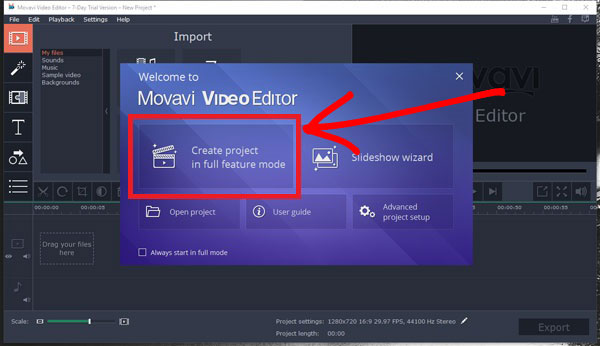
  1. Launch Movavi Video Editor and select ‘Create project in full feature mode’ in the menu.
  2. Speeding Up A Video With Movavi Video Editor
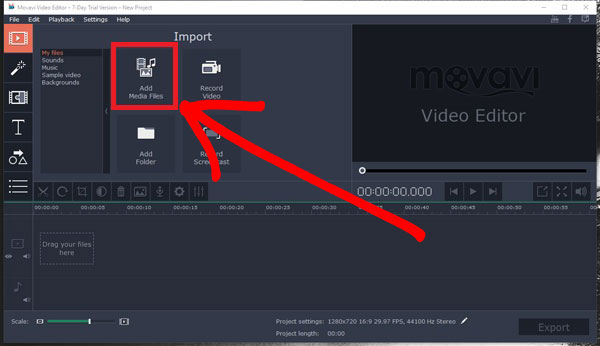
  3. Click on the ‘Add Media Files’ button and select the video that you want to speed up.
  4. Speeding Up A Video With Movavi Video Editor
  5. Click on ‘Clip Properties’ (i.e. the ‘cogwheel’ icon), and move the speed slider to the right to increase the speed of your clip.
  6. By speeding up the clip the audio will also play at an increased speed – which you may want to fix. To do so you can click the ‘Mute track’ button (i.e. the ‘speaker’ icon) and then add the original audio track again or add a new audio track of your choosing.
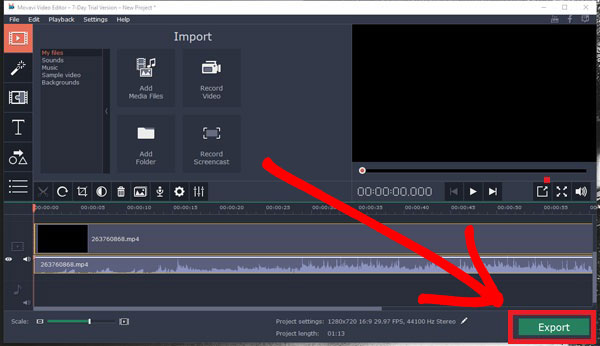
  7. Click ‘Export’ when you are satisfied to save your video.
  8. Speeding Up A Video With Movavi Video Editor
As you can see using the fast forward video effect in Movavi Video Editor is really a piece of cake. The only ‘tricky’ part may be deciding how you want to deal with the audio – which is something that you’ll have to do on a case by case basis.

If you really want to make your video look impressive however, it would help to explore, experiment with, and learn how to use the other features in Movavi Video Editor. One place to start is by using its features to process and edit the video footage so that you can cut and merge video clips, rearrange the sequence in which they appear, improve the video quality, and fix common problems.

After you’re comfortable processing video footage, you can move on and start to explore the various other features present in Movavi Video Editor. As you go along you’ll discover how to apply special effects and filters, utilize audio effects, insert stylish animated transitions, add customizable text, and more.

Assuming you spend a few minutes trying out and playing around with the numerous features in Movavi Video Editor, you’ll soon find yourself able to make full use of them. From there on out it is just a question of deciding how you want to edit your video, and using the tools available to do so.

Review of Google Allo - A Smart Messaging App

Review of Google Allo - A Smart Messaging App
The Allo is a smart messaging app from Google which lets you express yourself better by saying and doing a lot more through text. It is one type of Google Assistant.

What Can You Do With Google Allo?

  • Use more Stickers
  • Shout/Whisper
  • Smart Reply
  • Ink
  • Go in incognito mode
  • Meet with your Google Assistant

What’s Best?

It is featured with Google Assistant and available for both iOS and Android devices. The incognito mode allows the best end-to-end encryption and privacy.

What’s Not Good?

It doesn’t have video calling feature and GIF support. You cannot control the read receipt settings.

Cost: Free

We all have an array of choices for sending texts and media to our friends and relatives from our phone or computer. But, Google thinks that we need one more messaging app which is smart also, and it added it too.

The search giant company has launched ‘Allo’ in September 2016. Google has tried to answer or wanted to create an alternative to WhatsApp and WeChat messaging applications. And Google is succeeded to create a smart and easy-to-use messaging app for its consumers.

How Google Allo Differs From The Other Messaging Apps?

Google has made Allo stand out from the pack by integrating Google Assistant into it. We all know about ‘Google Now’ and how it works. The Allo Google Assistant works in this same manner. It saves your time and provides you the best information whenever you need.

Allo Google Assistant is a bot which uses the vast database of Google to let you know the answers to the questions raised in your mind. For example, if you want to find about ‘Sports’ then you will get results in Allo Google Assistant like below.
Review of Google Allo - A Smart Messaging App
It also translates languages if you want and allows you to chat with your friends and family members any time you want. If you are feeling lonely, then you can play games with it too.

Yes, it is absolutely right that for simply searching queries, the preferable way is pressing the home button of our device and then go to the Apple’s Siri or Google Now. But, the advantage of Allo Google Assistant is, you can use it simultaneously while you are sending texts to your friends and relatives. You can even ask verbal questions to it while the app is open. You can look for something without leaving the app, which makes it differ from other standard messaging apps.

Other Useful Features Of Google Allo

  • It learns your previous answers to some particular questions and suggests you the options when the same question is asked again.
  • The suggestions not only in the form of text, but you can even choose from Emojis and even photos.
  • You can add text to the photos before sending and also can doodle them to show your creativity.
  • Hundreds of stickers designed by the worldwide independent artists and studios let you choose your best-expressing sticker on Google Allo.
  • Generally, when you want to point out something in a messaging app, you send it in ALL CAPS. But Google Allo lets you change the size of the text with a quick swipe and allows you to say it quieter or louder depending on your mood.
  • The Incognito mode allows you to have an end-to-end encrypted conversation. It keeps your chat private and gives you the control of the durability of the messages you send with expiring chats.

Should You Switch To Google Allo or Not?

In the title, I have mentioned it a smart messaging app. I absolutely mean it too. The app quality is fine, and the chat stuff is perfect. The advantage of Google Assistant is helpful too for the people who do not want to change the screens or go out of the messaging window for looking to something. But, if you ask me whether you should switch to Allo or not? My answer will be, wait for some time. We have seen the Google experiments over the Google Hangout and Google Plus for the messaging options. But, it flailed around in its social attempts. But, as the messaging is the epicenter of our phone usage, Google has smartly tried to jump over directly onto it. But, as per its predecessor attempts, Google needs a fresh and cool start in the messaging strategy.

Bottom Line

On the day 1, Google Allo doesn’t seem to be perfect for a communication way. But, the integrate, and well-known Google Assistant sets the Google Allo something to be more interested and smart messaging app in the recent times. But, seeing with the technology perspective, there are other options which have already made their place as a well-developed messaging application. So, without fireworks in the background, not allowing the message to be invisible and the lack of video calling feature can make it hard for ‘Google Allo’ to become a favorite chat messaging app in the near future.

AUTHOR_NAMEAbout the Author:
Mandip is a graduate in Information and Technology. He is a passionate blogger, SEO Specialist, and a Software Developer. He loves to write on technology, SEO, micro job websites like Fiverr and Internet Tips and Tricks. Currently he blog at Best On Internet.

Add To Your Style With Lenovo Z2 Plus Smartphone

Add To Your Style With Lenovo Z2 Plus Smartphone
Lenovo Z2 plus is the most recent product of the company and within few days of its launch, huge number of sales have been witnessed. Most common opinions of the experts and users for buying this smartphone are good battery backup, great configuration and amazing camera that you have never experienced in any smartphone of this range. The flaunting features of this smartphone have greatly attracted the customers who have a good sense of buying mobile phones. If you are also planning to buy a new smartphone or replace your existing one, then go ahead and check out the great features offered by Lenovo Z2 plus.

Main Highlights About The Phone

This smartphone is a dual sim that includes primary 4G nano sim and secondary 3G nano sim that enables the user to take the advantage of 4G technology. Screen resolution of 1,080 x 1,920 pixels and a pixel density of 441ppi along with 5-inch full HD IPS LCD display together make the powerful and sharp display for this smartphone. If you wish to grab this phone, you can avail the Flipkart offers. Lenovo Z2 plus is powered by a Qualcomm Snapdragon 820 chipset and CPU of Dual quad-core Kryo processors that come in combination with 3GB or 4GB LPDDR4 RAM. A GPU of Adreno 530 makes this phone perfect for handling the powerful graphic that enable great gaming experience to the users. The price of Z2 plus 3GB RAM mobile phone is less as compared to the Z2 plus 4GB phone. Lenovo Z2 plus is Running on Android 6.0.1 Marshmallow OS which is the latest one that keeps this phone atop.

Lenovo Z2 plus is available in 32 GB ROM and 64 GB ROM models that makes this phone a good storage device hence the company has not provided option for expandable memory in this phone. Experts have reviewed that Z2 plus is an extremely powerful phone that is multitasking without causing any trouble and quickly responds to each and every touch.

Other features that will catch your attention are as follows-

  • Quality Camera For Clear Pictures


  • - 13-megapixel rear camera with Isocell sensor, LED flash phase detection autofocus, electronic image stabilization, f/2.2 aperture, geo-tagging, panorama and HDR make this smartphone a complete camera phone. This smartphone features a good quality front camera of 8MP and a 2.0f aperture which makes this smartphone adorable for those who love to click and post their selfie on the social media. It can also record the HD videos, up to 120fps in full HD resolution.

  • Unique Features Of Lenovo Z2


  • - It has a fast charging non-removable Li Po 3500mAh battery with the advance sensing technology that cuts off the charging when the phone is charged to prevent the overcharging of the battery. If you have a habit of leaving your phone in the charger for long time, then Lenovo Z2 plus is the right option for you. Home button is also powered with U Touch 2.0 fingerprint sensor which restricts the unauthorized access to the phone. 24-bit/192kHz audio feature makes the audio very clear even if you are in the wide open area.

  • Health App


  • - Google Now Launcher and U-Health app (which is the health app provided by Lenovo to track your data for physical activities and exercises done by you) are also preloaded in this phone. This preloaded launcher can also be changed as per the requirements of the users. Lenovo Z2 plus is a fully customizable smartphone that can be customized according to the needs of the users. All the connectivity options are offered in this smartphone including GPS, Wi-Fi and Bluetooth. It is available in two popular color that are Titanium Black and Ceramic White that gives it more classy and elegant look.

    AUTHOR_NAMEAbout the Author:
    This article has been written by Vinod Kardam, an expert and critic of newly launched devices and smartphones. He has his own blogs written on various topics and has an excellent readership too. He offers valuable insights on the pros and cons of every new launch in the market that can play a key role in your decision making while making a purchase.
    Find Me On GooglePlus

    5 Productivity Power Tools For 2016

    5 Productivity Power Tools For 2016
    Since technology is constantly innovating and moving forward, there is a common thought that we have no choice but to keep up with it and embrace as much as we possibly can. But is the reality really that harsh? As much as some people can disagree, this statement is completely true. Actually, nowadays it's becoming impossible to spend a day without your smartphone or laptop. Tools and applications have completely filled our daily lives and the majority of people are fine with that. Throughout the years, we happily embraced this new role that technology plays in both our work and private lives.

    So Why Does This Matter?

    Well, let's turn toward work to get an answer to that question. When it comes to our work, we can immediately notice some differences that were not present just a couple of years ago. Recently we have started to explore digitizing documents and streamlining certain tasks, which encompasses a wide variety of tools, some of which have experienced a significant rise in popularity.

    I can’t emphasize this enough — the better the tools, the faster our job is done. With this in mind, let's focus on the productivity tools that can help you finish your goals quicker. Luckily for us, in 2016 there are plenty of productivity websites and apps that we can use and enjoy. Here are our picks for the top productivity apps of 2016:

    1. Pocket

    Pocket is used for saving resources so you can read them whenever you find convenient.
    This is a really useful tool when you don't have the time to check something that you found online, but you wish to save it for later. You save articles, pictures, videos or any type of file for that matter. The application can be synchronized with your phone or computer and everything that’s in your “Pocket” can be viewed offline, as well. This is one tool that you’ll wish to have, trust us.

    2. PDF to Powerpoint

    PDF to Powerpoint converter is a perfect solution for people who would like to prepare PowerPoint presentations in minutes. Converting to PowerPoint has never been easier and with an integrated Optical Character Recognition (OCR) engine, this tool can convert both native and scanned documents. It is completely web based and free to use and the high conversion accuracy will keep your ppt document as close as possible to the source PDF. This way, you have more time to prepare your talk and dominate that public speaking event.

    3. Hipchat

    HipChat can be described as a team-based chat with a main focus on business users. It is a platform that provides features such as video calling, screen and file sharing, group chat and many more. It runs on all devices: Mac, Windows, Android, and iOS. With Hipchat, you and your team will always be informed and you’ll reduce the risks of not getting that important message. So bookmark it and keep on chatting.
    5 Productivity Power Tools For 2016

    4. Mindmeister

    With MindMeister you can easily capture and share your own or your team's ideas. It helps you the most in the initial brainstorming phase, if you are starting out a new project or if you simply have an idea that you’d like to work on. Not only that, but you can take notes, plan projects, create business strategies and get involved with many more inspiring tasks. It is completely web-based, so just open your browser and start creating your mind maps. If you are a creative person who thinks visually, then this is a perfect tool for you.

    5. Unroll.me

    I am sure you are extremely familiar with the concept of email newsletters. Almost every service you sign up to will bombard you with a ton of promotional emails, some of which are completely irrelevant and you simply can't be bothered to read them. Introducing, Unroll.me.

    Unroll.me identifies your email subscriptions and compiles them into one rolled-up email list. If you don't have time to regularly clean your mail, this tool makes your inbox shine bright like a diamond (no pun intended, Rihanna).

    Unroll creates a unique place for all those newsletters so you can go through them if you wish to and not spend ages opening every single newsletter email. Clean inbox — clean life, right?

    One thing is certain: with tools like these you will certainly increase your productivity and manage everyday tasks more easily. With increased productivity, you will be a beast in the office which means you’ll have more courage to take on even the hardest of tasks. By embracing technology, you are allowing yourself to a self-confidence boost which will, in turn, give you better results and increased energy.

    Bottom Line?

    You can achieve all of this with a set of carefully picked online tools. Not so bad if you ask me.

    Android N Revealed! And It Is Not Nutella

    Android N Revealed! And It Is Not Nutella
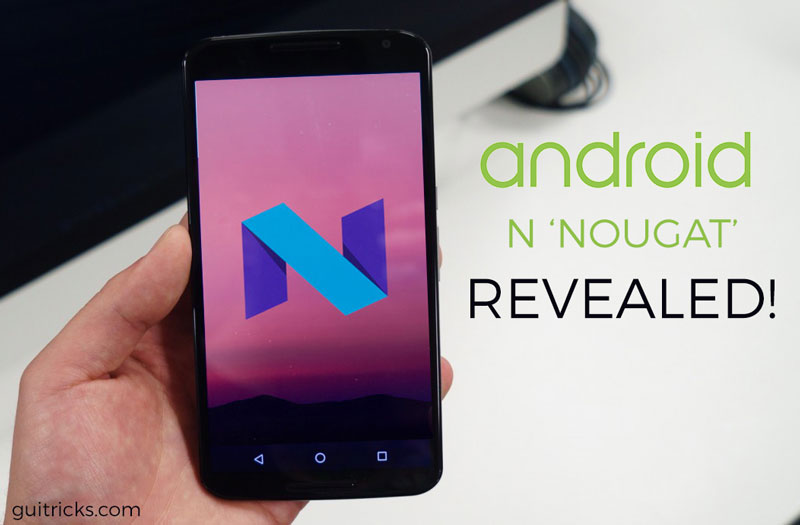
    Google has now officially announced next Android version 'N' which is officially named as Nougat. Yes! Nougat is the next latest Android version, after the Marshmellow. It is actually 7.0 that will be the beast and i'm sure this one next will definitely steal 2016's show.

    Lollipop and Marshmellow were quite different when these were released. And It's expecting same for Nougat too. Before announcing its official name, Google was thinking to give name Android N (Nutella). But due to some factors or reasons, i even don't know, Google has decided its name Nougat.

    Here's a list of previous Android versions:
    • Android 6.0 Marshmallow (October 2015)
    • Android 5.0/5.1 Lollipop (November 2014, March 2015)
    • Android 4.4 KitKat (October 2013)
    • Android 4.1/4.2/4.3 Jelly Bean (July 2012, November 2012, and July 2013)
    • Android 4.0 Ice Cream Sandwich (December 2011)
    • Android 3.0/3.1 Honeycomb (February 2011)
    • Android 2.3 Gingerbread (February 2011)
    • Android 2.2 Froyo (May 2010)

    Before releasing its name, Google set up a website to submit suggestions for the name of Android N. So i think, due to the reduced rating of the name Nutella, Google decided to change its name and set 'Nougat'.

    From this way, Android has maintained and still maintaining its tradition of naming by the names of alphabetically ordered. You can check here an example:
    • Cupcake
    • Donut
    • Eclair
    • Froyo
    • Gingerbread
    • Honeycomb
    • Ice Cream Sandwich
    • Jelly Bean
    • KitKat
    • Lollipop
    • Marshmallow
    Now upcoming is Android N 'Nougat' and i hope, after that next will start from alphabet "O".

    This is a very nice video which covers what people suggested new names and how Android N became 'Nougat'.


    With the releasing of Android N, Google Android team is introducing new features as well that will helpful for smartphones and tablet users. Android N 'Nougat' will cover lots of improvements including redesigned notification panel, a split-screen multi-window mode, VR enhancements, seamless updates, a new Data Saver mode and more other improvements. So you can download its Developer Preview, but make sure your device should be supported.

    Brillo - Google’s New Operating System For IoT

    Brillo - Google’s New Operating System For IoT
    Bringing the simplicity of software development to hardware for IoT (Internet of Things) by using the embedded OS, developer kit, core services, and developer console, Google has introduced its new Operating System – Brillo. It was announced at Google I/O in May-2016, and since then, no further details were shared by Google.

    Brillo has mainly three elements:
    1. Developer Kit
    2. Core Platform Services and
    3. Android-based Embedded OS

    The BDK (Brillo Developer Kit) runs on Ubuntu 14.04 and is based on the build architecture of Android.mk. it can perform local unit tests and individual integration tests with its extensive testing tools. The developer kit can integrate with the current test and integration environments. The ADM (Android Debug Bridge) can be used to inspect, test, and update the target devices.

    The core platform services include Weave to help devices connecting with the network securely. The Weave is the cross-platform, a common language for Brillo. Weave-enabled devices can be connected to the mobiles and desktops and can talk seamlessly with each other. The Android devices will automatically detect Brillo and Weave enabled devices. The core services also include Metrics component, which collects usage data from the user permitted devices. The updated version of the software and patches can be pushed by the administrators via OTA (Over-The-Air).

    The Android OS is an open source software. It gets updates every six weeks with an LTS build support update every six months. Brillo can target Intel, ARM, and MIPS architecture with a built from the source code. It can run on devices with the configuration of at least 32MB of RAM and 128Mb of storage. Google is working with its hardware partners to announce the compatible boards to Brillo. These boards are and will be tested and certified to work with the current and future versions of the Operating System. Every Brillo compatible board will come with the proper documentation and samples. All this information shows that Google is ensuring the best developer experience with keeping its devices up-to-date.
    Brillo - Google’s New Operating System For IoT
    Brillo will support Bluetooth Low Energy, WiFi, and other Android things. Check the advanced and main features of Brillo for IoT:
    • You can flexibly prototype the custom applications, also you can move prototype to production easily. All other things are already built-in.
    • A single developer console provides the services of device scaling with OTA updates, runtime metrics, and crash reports.
    • You can build a single iOS or Android app to control multiple devices in your work or home environment with Google services like voice actions.
    • Built-in Weave will give the confidence to users for working on their connected devices each other.
    • It has a built-in automatic setup and easy-to-use sharing.
    • It also has a built-in security feature limits the exposure to attacks, allows you to quickly recover compromised devices, and uses hardware and software encryption to easily secure all your data.
    • It works on very low power devices with a minimum of 32MB RAM and 128MB storage capacity.
    • You can choose from a variety of customizable options and hardware capabilities to develop with Brillo.
    • It will be compatible with specifically designed boards from Intel, Qualcomm, Marvell, NXP, and Imagination.

    Until the point of introducing Brillo, Google was quite on its IoT plans, especially since it has acquired Nest last year. Running on very low powered devices and communicating with the other nearby connected devices will make it very useful for the developers all around the world. It can power any electronic device which can connect to the Internet, whether it has a digital screen or not. It will make to build everything from making “smart fridges and light bulbs” to the garden monitors like IoT devices. Surely, Brillo will bring a new revolution in Internet of Things (IoT).

    AUTHOR_NAMEAbout the Author:
    Mandip is a graduate in Information and Technology. He is a passionate blogger, SEO Specialist, and a Software Developer. He loves to write on technology, SEO, micro job websites like Fiverr and Internet Tips and Tricks. Currently he blog at Best On Internet.
    Find Me On Facebook | Twitter | Google+

    Movavi Video Suite [Review]

    Movavi Video Suite [Review]
    Starting to create a video from scratch can seem like a fairly monumental task. Even if you’ve already recorded some of the footage that you need using your smartphone or digital camera, it will need to be processed to turn that raw footage into a polished and attractive video.

    If you’re looking for an easy way to make videos, Movavi Video Suite (http://www.movavi.com/suite/) is well-positioned to fit your requirements. It is a comprehensive video creation suite that contains all the essential tools you’ll need to not only process video footage, but also capture it and manipulate it in unique ways.

    Intuitively Designed

    One of the main areas where Movavi Video Suite distinguishes itself is in its user-friendly approach. Considering video software in general has a reputation for being complicated and technical, the software’s easy-to-use nature makes it stand out.

    With a slick and simple user interface that can be navigated intuitively, controls that will feel familiar, and automatic tools that can be applied with a single click – it won’t take you long to be able to learn to use Movavi Video Suite, even if you’re a beginner. In fact within fifteen to twenty minutes you should be able to have created your very first video.

    ‘All-in-One’ Video Software

    Of course, the part about Movavi Video Suite that is truly unique is the fact that it is an ‘all-in-one’ video software that will help you across the board when it comes to creating your videos. Using the impressive list of features that it provides, you will be able to:
    • Record video footage from a webcam or by using screen capture to record videos directly from your screen.
    • Digitize videos from analog sources such as VHS tapes, TVs, and so on.
    • Process the video to improve its quality by fixing any common issues that could be affecting its appearance and enhancing its overall image quality as well.
    • Cut the raw footage into segments and combine it in any sequence by simply dragging and dropping it in place to create a ‘final cut’.
    • Make use of stunning visual effects such as animated transitions between scenes, filters that alter the visual style, and even ‘Hollywood-esque’ special effects.
    • Add audio tracks to the video to include background music, voiceovers and narrations, or even sound effects.
    • Place text directly within the video as subtitles, captions, or watermarks and fully customize its appearance.
    With that glimpse into the capabilities of Movavi Video Suite, it should be easy to see just how it could help you to create videos that are truly impressive. Rather than wait, why not jump right in and give the software a go as you try to create your very first video – right now.