Showing posts with label Web & blog. Show all posts

How To Start Your Own Website?

How To Start Your Own Website?
How To Start Your Own Website
If you want to learn how to build a website from zero, you are in luck. We have broken down the process of building a website into a few easy-to-follow steps so that you can ensure that your final product is a comprehensive, well-designed website.

We will cover everything from website objectives to website hosting and domain names. But before we start, it must be highlighted that the hosting plan is quite important. For that reason advise you to choose a reliable provider that has a high rating on hostadvice.

So let’s start:

1. Develop A Website Plan

Before you begin to build a website, you must have a clear vision of what you hope to accomplish with it. This will serve as your road map. Prior to creating your website, think about its purpose so that you can design it accordingly.

You need a good idea for a website, which you then build by going through the web page planning process. If you're stuck for ideas or don't know where to begin, research the specific niche you want to get involved with, and see what your competitors are doing.

2. Determine Your Website's Goals

Your website needs to have a clear purpose, just like a business does.

What are your intentions for using a website?

Are you using it as an addition to your company?

How does it fit in with the main goals of your company?

Do you want to build a website to inform, promote, or sell products?

Try to be extremely precise when answering these questions.

Your website needs a blog if your main goal is to inform your visitors and develop your brand as a leading figure. You will want to choose a straightforward landing page if your goal is to advertise a particular project or product. If you want to set up an online store, you'll need a complete website with ecommerce capabilities, etc.

3. Find A Domain Name and Lock It Down

Every website needs a domain name, which serves as its internet address. Although choosing a domain name may seem easy, it actually requires a lot of consideration. You could publish your website by using a free domain that is owned by another company or buy your own exclusive domain name.

If you are opening a website for your business, your domain name needs to depict your business name because it will represent your business online.

You don't have to choose a ".com" extension, but domain extensions are still essential to creating strong domain names. You can locate sector-specific domain extensions that really can help you present your websites online.

You can choose ".shop," ".trade," ".store," or other extensions if you run an online store. Meanwhile, ".study," ".academy," and ".education" will be great choices for you if your website is for e-learning.

4. Select A Web Hosting Provider

Choosing a web hosting provider and a platform to create your website is the next step in establishing a foundation for your website. You can either make a website yourself using a website-building tool, or you can hire a specialist to do it for you. However, you must take care of web hosting before you begin creating.

Every website has a server that houses the online data, including code, content, and multimedia, and makes it available for viewing and management. You need to find a plan that has storage and memory according to how much content you plan on adding to your site.

You must be careful when choosing a hosting company because hosting services are essential for ensuring the security and seamless operation of your website. Make sure that your plan contains storage space, virus and malware protection, and excellent 24/7 assistance to handle any potential issues at any moment of the day.

5. Create Your Own Website

There are specialized tools that make it simple to develop a new website without any programming or technical skills, you can get a lot of aid if you decide to take everything into your own hands and design your own website.

Website builders and systems for content management are your two main DIY website creation alternatives. They are simple to use and beginner friendly.

6. Search Engine Optimization

You've completed all the steps necessary to build a fantastic website, but SEO is still needed to make sure your efforts are successful. To reach the correct audience and achieve high ranks on popular search engines, search engine optimization (SEO) is essential.

The core of SEO is making calculated changes and alterations to adapt to search engines such as Google or Bing in order to secure a position among the first results when a person searches for a particular term. When you take into account that 93% of visitors choose a brand that is on the first page of their results, it becomes clear how important it is to rank well on results pages.

Conclusion

Creating a website is a lot simpler than you might think. If you follow these steps, you will be able to launch your new site within a few days.

Key Benefits Of Using Airbnb Review Widget On Website

Benefits Of Using Airbnb Review Widget On Website
After long days of work, we all deserve a vacation, don’t we? So after taking time out on planning, preparations and deciding the destination, we finally look for accommodations. And for accommodation, we have our well-trusted Airbnb. But with such options, you need to decide on that one place where you can house and have a worthy vacation.

So how should we decide on the place? - By reading reviews and about previous visitors’ experiences. So, why is it important to read those reviews? - Firstly, it helps us to know the place, and we can create a perspective about it. Secondly, it is our hard-earned money and deserved vacation. Who would like to spoil it, right?

Hence reviews are important, so if your businesses are related to Airbnb, reviews become more important for you; while people might struggle to find reviews for your business, you can provide them ease for your reviews, and that is by displaying the reviews on the website by embedding Airbnb review widget on the website.

Various tools like social media aggregators provide the Airbnb widget and provide you with ease to embed Airbnb review widget on the website. You can find these tools on the internet easily; they are easily accessible and can be comfortably operated.

But the major question remains - How can embedding Airbnb Review Widget can help your business. Hence, we have sorted out some major benefits of this strategy that might draw your attention and encourage you to embed the Airbnb review widget on a website.

Benefits Of Adding Airbnb Review Widget On Website

The Internet is a wonderful place, you can find anything that you want, and the same is the case with reviews. Although it eats people’s time, they eventually end up reading reviews. So how about providing them a destination where they can easily find and read all Airbnb reviews related to your business. It saves time, so that is how it is helping consumers, it can provide the following advantages to you.

1. Builds Credibility For Your Business

Sometimes it can be tough to convert your potential customers into your customers. While product advertising and promotion might not impress them, reviews and feedback can be that factor that can influence their purchase decision. So as it is important to collect reviews, it is also important to showcase them. And as you display them on your website, it has chances that more people will be able to see/read them and hence helps you in building credibility.

2. Keeps The Visitors Engaged On The Website

Reviews and feedback can be an interesting read for consumers. It provides them with a different perspective about the business and provides all needed insights about the business. People always have a different look out on things and can have different experiences or approaches for a particular thing. So while writing their reviews or providing their feedback, they present their perspective. So, when you display all these reviews on your website, it keeps the visitors engaged on your website, and it might instill an interest in their minds and eventually help you win that customer.

3. Hold Visitors On Your Website

As people have more options to look out for the reviews, they have ample options in the market for the same product/service. Hence it is important to keep your potential customer focused on your brand as it can increase the chances of attaining sales. By embedding reviews on your website, you can engage the visitors and at the same time, hold them on your website. So when they will be reading more about your business, it can help them in their buying decisions and convince them to use your Airbnb accommodation.

4. Develops A Review Cycle

The Internet often creates peer pressure, and people often try to imitate what other or large majority of the people are doing. So, when your consumers view other people’s reviews getting a feature on the website, it encourages them to write reviews for you as well. And even your customer will be encouraged to write reviews to enjoy their spotlight on your website. So it develops a review cycle, and as there will be more reviews for your business, it might increase your market reputation and can help you to reach out to more people.

5. Builds A Strong Customer-Brand Relationship

A customer feels esteemed when a brand showcases the review on their website. It shows that brands care about their customers and consider their feedback. And it can eventually help a good relationship between brand and customer. Moreover, when you showcase reviews, it shows that you care about your customers and have nothing to hide from your potential customers. It eventually increases your reputation in the market and hence assists in improving your brand recognition.

Conclusion

Reviews are important businesses and customers. For customers, it helps them know the business and product better and assists in the purchase decision. While on the other hand, it helps businesses to know their flaws and reputation in the market. And another hidden advantage of reviews for the business is that it develops a reputation for them, hence while it is important in receiving them, it is also important to show them as well. By embedding reviews on the website, you not only provide ease for customers to find a common place for your reviews but also makes reviews effective as people would be able to read them. So go ahead embed Airbnb reviews on the website, and enjoy the amazing benefits it offers.

3 Actionable Ideas To Increase Website User Engagement

Ideas To Increase Website User Engagement
Let’s face it, a website without a good user engagement is just useless and it won’t be anything more than just an online presence of your business. If you really want to use the internet and the web to help you grow your business then the number one thing you have to do is to grow your user engagement. The more the users engage with your business, the more successful you are and it’s a pretty simple rule especially for a business website.

Increasing user engagement of your website is not an easy task especially if you are new in the online market then yes, it’s going to be a daunting task for you because right now there is a lot of mess on the web as almost everyone is trying hard and running a rat race to increase their user engagement so yes, it’s going to be very difficult in the beginning. Now, here you have to understand that there is a difference between attracting the audience to your site and engaging them. Even if you succeed and attract thousands of visitors to your site, it won’t be enough until you are able to engage your visitors and make them perform the desired action.

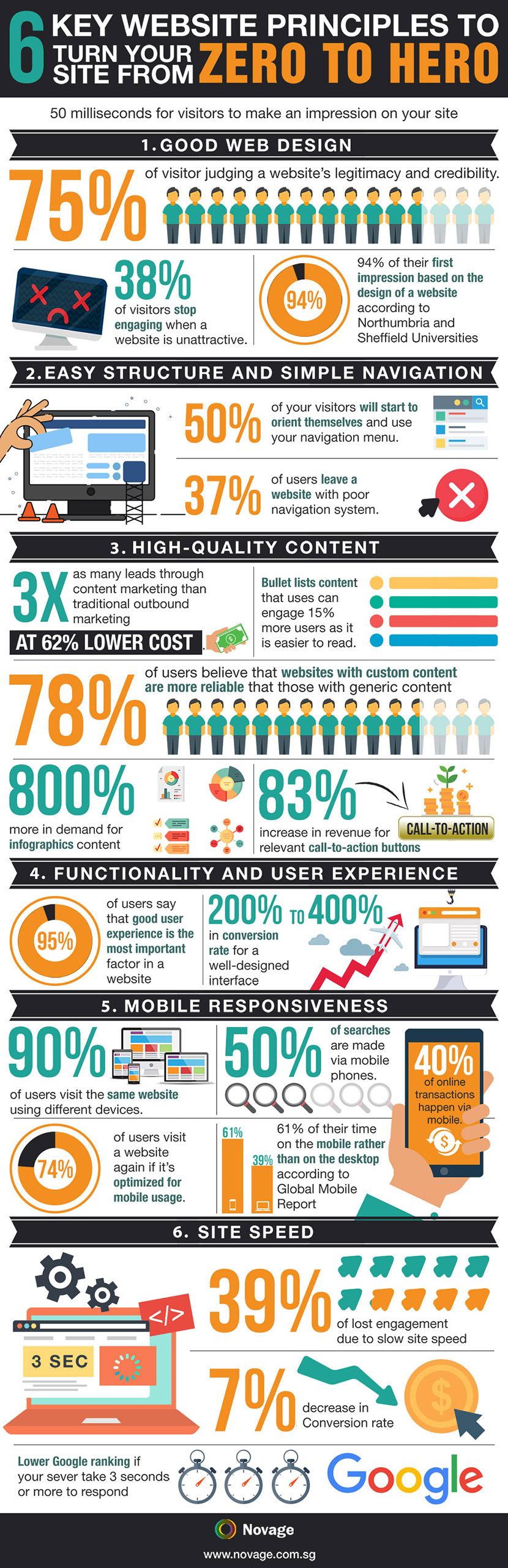
If you are someone who just got his website made then you have to understand the importance of turning your website from zero to hero and when it comes to the process then it's all visually described in this infographic thoroughly defined 6 Key Website Principles To Turn Your Site From Zero To Hero:
Ideas To Increase Website User Engagement
Want to know more ways to increase your website’s engagement? Here’s what you need to do;

1. Reduce The Page Load Time

You know how irritating and annoying the slow loading pages on the internet are and this is not something that can everyone can tolerate. People just have the websites that take a lot of time to load and this is something that can increase the bounce rate of your site because honestly, people don’t have enough time to waste on your site to load. If you site is taking a lot of time, they will just shift to some other website and they might not ever visit your site again. So, before taking any other step, just reduce the page load time of your website and make sure it’s responsive.

2. Your Content Must Be Unique And Attractive

Content is known as the king of online marketing and you cannot just neglect its importance. So, whatever you are posting on your website and whatever content you are uploading, just make sure that all of it is original, attractive and interesting. Yes, you read it right, if you really want the users to engage with your site then you have to focus as much as you can on your content. In fact, the content of your site must speak for your business so don’t leave any stone unturned when it comes to creating some extraordinary content.

3. Know Your Audience

It is but very obvious that if you want someone to talk to you about your business or use your services, you first have to fulfill their requirements. Same is the case with your website and increasing your user engagement. If you really want to start a conversation with your followers and increase traffic on your site then you need to know your audience, their requirements, their desires and most importantly, you have to know what they expect out of a good company.

These are a few things that can actually help you with the user engagement of your site. So, without wasting any further time, use these tips and make sure to constant with your efforts because sooner or later, you are going to get some amazing results.

Why You Should Use WordPress To Design Your First Website

Use WordPress To Design Your First Website
You have probably heard about WordPress – it is a great blogging and website platform that hosts some of the most popular blogs and websites. And when the time came for you to design your own website, you first turned to this popular platform.

But with so many other options out there, it can be hard to decide which one to pick to be the home of your business website. If you are in need of information on how and why WordPress is the best choice for you, here is a list of reasons why you should use WordPress for your website.

According to statistics, 26.7% of all websites are powered by WordPress and it is almost 75 million sites.
Must Check: Why Selecting WordPress For Your Business Is Best Choice

It's Easy To Maintain, Use & Update

With custom design, HTML websites, you would have to hire a webmaster to update your content, add more things and maintain your website on a monthly basis. But with the simplicity that WordPress offers, you do not have to do that. It is extremely easy to use and even those who are not that skilled with computers can easily handle it.

WordPress Is Versatile

No matter what your business is, which niche it belongs to and what kind of website it needs, it can be created on WordPress. From bare-bones simple blog to a complicated website with many pages and additional elements – this excellent platform can do it. There are thousands of paid and free themes that you can use.

If, however, you are not satisfied with your options, you could always design a new one for yourself or hire someone to do it. The best thing is, you do not have to be extremely skilled with HTML, CSS or PHP and it will not take you much time to do create a wonderful theme all your own.

Elizabeth Jennings, a web designer at PaperFellows.com shares, “Its versatility is one of the best things about WordPress. No matter what you might want or need, it can be done on this platform. With simple coding and a learning curve, there are endless options for everyone.”

It Will Save You A Lot Of Money

With professional services from website developers costing more than $2000, it can be hard to decide upon spending that money, especially for small and medium businesses. But with WordPress and its simplicity, this is not an issue. It will not cost nearly as much and you can do some of the design on your own and still get the same effectiveness.

It's Excellent With SEO

This platform is SEO friendly and Google loves it. The practices used to create WordPress and the fact that it's text-based, makes search engines display results from WordPress high in the search results. In addition, there are a lot of SEO plugins on WordPress that help the websites find their way to the screens. This is a great thing for every blog or website and it could help in their development.
Use WordPress To Design Your First Website

It Offers Great Plugins

WordPress has more than 50 000 plugins, most of them free. These plugins make an ordinary website or blog into something powerful and modern – they can give you aesthetic features, security, SEO optimization etc.
Some of the most popular plugins on WordPress are related to SEO optimization. You could use, for example, WordPress SEO by Yoast, SEMrush, Google Keyword Planner or any other. Also, WordPress, sadly, does not offer content plagiarism checking tool, but you could always use other free tools like Copyscape or Academized. This part is crucial because all your SEO efforts can be useless if your content is not unique.

Content On WordPress Is Easy To Manage

Most complaints on other platforms are related to content management. This is another area where WordPress is the best. Content is easy to post, edit, erase and format – you can do it yourself, without hiring anyone to do it for you.

WordPress also offers free spell check as you type or paste the text – however, this does not cover all of your mistakes, so it is recommended that you use some other free tools like Big Assignments for proofreading and grammar or State of writing and UK writing for editing.

Formatting with WordPress is also easy as you can add bullet points, bold or underline your text or anything else that you may want to do – but in case that you need some more formatting help, there are many tools available online.

It Offers A Lot Of Support And Security

WordPress has been here for ten years, supporting brands, bloggers and websites. It has myriad of help resources if you stumble upon a problem, great developer team that is always there for its users and a friendly community who loves to help.

In case your concerns are more related to security, updates and changes are made smoothly to ensure that WordPress users are secure and safe on this platform. And if you do all necessary updates and use recommended tips you can be sure that your WordPress website is secured.

John Bloomberg a web developer and founder of Australian Help explains, “With the WordPress community being here for over ten years, it's easy to find help whenever it's needed. So many people and brands are using it that solutions to every problem are just around the corner. Another great thing about a friendly community is that it is ready to give newcomers assistance.”

Final Thoughts

If you are in need of a website but you do not want to spend a lot of money or time then WordPress is the choice for you. It offers so many great tools and options for everyone, no matter how skilled at working with coding and website maintenance.

This is also a great option for small or medium businesses who would like to have an online presence but they do not want to hire web designers on a monthly basis to do the updating and maintenance. WordPress is fun, easy to use and excellent in every way.

AUTHOR_NAMEAbout the Author:
Brenda Berg is a professional with over 15 years of experience in business management, marketing and entrepreneurship. Consultant and tutor for college students and entrepreneurs at Oxessays. She believes that constant learning is the only way to success. You can visit her personal blog at Letsgoandlearn.com.

A Comparative Study Of Joomla vs Drupal 2018

A Comparative Study of Joomla vs Drupal
The Internet is developing faster than ever. The total number of users in the web-space is quickly increasing every day. There are many industries, firms and companies that don't have an online presence, seriously think about taking their business activities to the online platform. With the invention of different content management systems, you don't need to learn several programming languages to create websites and blogs. Both technical and non-technical persons can easily create all types of websites and blogs with the help of a CMS.

Joomla & Drupal are among the most popular content management systems of the world. Since long, there have been heated arguments that which CMS-between Joomla & Drupal- is the best for creating websites? Each of these two content management systems has its own distinctive features, advantages and disadvantages. So, we will review some important features of both Joomla & Drupal and try to determine which one is best for developing websites and blogs.
Don't Miss: How To Convert Joomla Website To WordPress

1. Ease Of Use

If you look at modern websites, the majority of webmasters use graphics to determine which CMS is suitable for different specifications. As you see in the picture, when it comes to ease-of-use, Joomla stands in the middle. Drupal is very difficult to use (for non-technical individuals). But, it is ideal for complex web development projects.
A Comparative Study of Joomla vs Drupal

2. The Availability Of Modules

If you own and operate a Drupal Website, you can get a fairly large collection of quality modules at drupal.org as per your needs. Install the useful modules on your website to add more functionalities/features to it and serve a large number of visitors that come to your website on a daily basis. You can also get industry-specific Drupal modules from Drupal developers.

Joomla offers three kinds of modules: components, modules and mambots. Each of these 3 has own, limited features. You can use them as per your specific needs.

3. User Rights

Joomla supports the multi-purpose use of websites, but it does not provide the necessary flexibility in daily work. It allows individuals to contribute to the website owner as a registered user, Author, Editor, and Publisher.

At a lower level, users can write materials. Someone else will review and publish it. If you allow the author to write and publish his/her content himself/herself, he/she can edit other materials also. Is there any way to restrict the user role in Joomla just to his/her own materials? The simple answer is No.

Drupal, with standard tools, offers a very flexible assignment of rights to users. If these rights are not sufficient for you, use additional modules to expand the flexibility. If you use your own module, then restrictions surface due to the lack of imagination and laziness.

4. Website Structure

There are several sections and categories in Joomla. You just need to place your materials in the right categories. There is a three-level hierarchy. So, use them as per your specific needs. The developers of Joomla offer Static materials so that Joomla users don't feel any problem while creating and operating Joomla websites.

With the help of taxonomy, you can make any hierarchy as per your needs while operating Drupal websites. You can create your own material and place in the hierarchy of the site as you deem suitable.

5. Economic Considerations

Although Drupal provides the greatest flexibility to a webmaster, its administration is extremely complex and has a very high entry threshold. Entrepreneurs would need to hire an expert webmaster to operate Drupal websites that come at a considerable price.

Joomla has a much larger community of developers than Drupal if you think it from the point of view of communities supporting CMS. So, this is the reason as to why developers prefer to work with Joomla. On the other hand, the experienced Drupal developers are difficult to find and they are more expensive than the developers of Joomla.

6. Design Patterns

Always keep in mind that Joomla is object-oriented. On the other hand, Drupal is based on old PHP 4 procedural programming. So, Drupal offers obsolete design patterns, such as Procedural, Hooking etc. Joomla implements modern design patterns that are used in the best frameworks, such as Zend and corporate programming languages, Object orientation, MVC (Model View Controller, Singleton. You should know that some design patterns can be implemented in both CMSs, such as DBAL. The use of these modern practices is associated with the continuous improvement of the Joomla and CMS frameworks. On the other hand, Drupal is always stagnating.

7. Database

On Drupal websites, views are accumulated in the database. So, you cannot put them under version control and developers cannot collaborate while developing specifications. Each new content type in Drupal creates a pair of database tables, which means the database structure changes over time if the webmaster creates and modifies content types. This creates problems for developers who create Entity Relationship Diagrams (ERD) while developing a web application. You should never rely on ERD because the number of tables and the base schema will be different when you see the database on the next time.

In Drupal, all logs are stored in the database. Keeping logs in the database means that it is very difficult for them to access, analyse and profile. The developer can't use Linux tools to process and analyse logs. The process becomes slower and takes up a huge amount of disk space (many gigabytes) for storing databases. This makes the database system large and inefficient. For a large site with high traffic, it is impossible for website owners to analyze the logs.

So, which one is the best for creating websites?

Experts believe that new Drupal 8 (which is yet to be released), will eliminate several problems related to Drupal. For the time being, it is not even worth considering using Drupal in large-scale projects. So, Joomla is better than Drupal on all parameters. Therefore, you must use Joomla extensively in web-development projects if you have to meet the growing needs of your clients easily and effortlessly.

AUTHOR_NAMEAbout the Author:
Marie Thomas is a Web developer by profession and Writer by hobby. She works for WordSuccor Ltd.- best wordpress development company in USA. Also passionate about Drupal and Jumla web development. If you need to hire a Wordpress developer you can contact us on Google+, Facebook, and Twitter.

How You Attract More Clients For Business From Website Design?

Attract More Clients For Business From Website Design
A website is a digital sword every business needs to their area of impact. You must be wondering how these websites can really help anyone in building their business. Let me be very clear about this, online searches about a company are one of the most common things that happen. As a marketer, you must understand that a digital platform like a website helps you a lot in reaching out to potential prospects.

A web design is the first impression of your business website. When a potential prospect looks into your website, many things can drive him/her to associate with you or otherwise. The website design is the first thing. It is the first impression that you give to your prospect is via your website design.

In this post, you will get to know about some methodologies that will guide you to attract clients and customers to your website. Not just that, these tips will drive your prospects to stay more on your website which will give you ample of opportunities to convert them into your regulars.

So, are you ready to rumble!!! Let’s get you started,
Don't Miss: Make Your Own Site Using Dreamweaver CC

A Quick Fact Check

This is just a fact check before you get into any of the tips and tricks about web design. Let’s have a look at these statistics,
  • Over 57% of SMB intend to invest in a new or improved website.
  • Pages that are loaded in 2.4 seconds have a mobile conversion rate of 1.9%.
  • The pages that are loaded in 2.4 seconds experienced a 12.8% of bounce rate. This bounce rate elevated to up to 20% for those websites which load in 3.3 seconds.
  • Mobile messages that are 1 second faster experience up to 27% increase in the conversion rate.

Tips & Tricks For The Web Design Of Your Business

These tricks may sound too general but believe it or not, these are not general at all. They are essentials. You will find some of the tricks common, but all of them are not. Ok, enough bragging. Let’s get started with the tricks,

1. You Need To Have Better Understanding Of User Experience

So, the term UX. Arrr….you heard it again. In website design, the user experience is the only target and if that goes up or down, your website traffic will tumble down like a pack of cards.

And now, there is another term, UI. The User Interface. This is where you need to work, to make your web design effective. A user interface is a scenery where your prospects see your artwork aka website.

So, what you need to do to make it enticing? Let’s have a look at these points,
  • First, clear the difference between UI and UX. You can think of UI as the graphics and design while UX is more like the path taken by the user to navigate your website.
  • As a UX designer you need to shift your focus more on navigation links and menu layouts; the location and design of the button; if your website has a shopping cart, then you need to check its usability; the quality of design, the easiness in navigation, the sitemap of the website. Remember, if you make website navigation tricky for your prospects, then no visitor will stay on your site for long.
  • Incorporate both UX and UI in your mind before you strategize your website design structure. To attract and convert your audience, you need to think traditionally and differently at the same time.
Attract More Clients For Business From Website Design

2. Web Design Tips To Make An Enticing First Impression

A web design is not always the matter of icons, graphics, and visual elements. It is also about the way of content presented, the type of images being used, what message does the graphic conveys, is your business motives are present in your web design? These all things come up together and then make a web design feasible for an audience.

The performance is also a very notable factor in web designing. A page speed of web page can make and unmake the traffic of your business. As from the statistics above, it is very clear that the page speed has clear effects on the traffic of the website.

3. Pleasing Yet Easy To Use

Your website must be pleasing in the eyes of your audience. While designing a website, you must think with the perspective of users. There are many web designers who neglect this basic thought and end up tracking the wrong hill.

Do not go on that path. Understand your audience first and only after that initiate designing for your website. If you are revamping your old design, then you should consider looking into your traffic data before proceeding. A few A/B testing of homepage layout can give you a fair idea of which one is more attractive.

4. Industry Features Are Must

Do you examine your competitors? If not, now is the right time for that. Following the industrial norms in website design will generate reliability among your target audience. Understand the industrial requirements, whether your business niche required a dynamic website or a static website. This will decide your user’s will to interact with your website.

5. Enticing Web Pages & Navigation

As mentioned earlier, an easy navigation is a must in a website design. You must make sure that your website navigation is easy and interactive rather than being passive in nature. Also, the web pages must give clear and concise information about your business, what your motives are and what you want from your visitors. This information must be clear and direct.

Over To You

These tips and tricks are simple to follow. These are things which will drive you to strategize actions that can lift your website as a business and get maximum traffic to convert.

I hope that you like this post. Let me know your thoughts about these points. Till then Adios!!!

AUTHOR_NAMEAbout the Author:
Morris Edwards is a passionate blogger and professional software developer at Awebstar who started his career in web development 10 years ago. He has developed an amazing appointment booking software helping business to increase sales. It is a renowned web designing company in Singapore. He loves writing about Business Ideas, Customer Management, and everything about new innovations and happenings in the business world. When not blogging, he loves spending his time in social networking.

11 Content Creation Apps And Resources For Your WordPress Website

Content Creation Apps And Resources For Your WordPress
Content marketing is probably the most frequently used form of digital marketing in today’s online environment. Every brand, small business, or blog is dependent on content in one way or another. Quality content helps you improve your website’s visibility and reach.

As a content developer who works for Essay Geeks, my job is to strategize and develop amazing content for different companies and blogs. In today’s post, I’m sharing the 11 content creation apps that skyrocketed my writing results, all while improving the content marketing performance of my company.
Don't Miss: How to Write Content to Attract Your Target Audience

1. Grammarly

Grammarly is one of the best grammar tools in the marketplace, helping thousands of writers solve their grammar and spelling issues. The app can be integrated with your Word processor, can be downloaded on PC, installed on mobile, and used on the web. Every time you finish writing a post, put it into this app and let it correct your mistakes.

2. Hemingwayapp

Great content is always simple and easy-to-read.Help your readers understand everything you mean to say by using simple language and easy-to-grasp terms.Hemingwayapp detects your text’s “readability” degree and gives you a specific score. Such a useful app, and it’s all free!

3. Ilys

An interesting application that’s perfect for every writer that regularly deletes his sentences before finishing. With Ilys, you only have to establish the number of words that you want to write and start writing. You won’t be able to see your text because the app shows you only the last typed letter.

4. Plagiarism Detect

Publishing plagiarized content is going to hurt your website’s search rankings big time Google will punish your brand severely by decreasing your SERP rankings. If that happens, your organic traffic will slowly disappear and you’ll miss a lot of opportunities.

Plagiarism Detect is an app that keeps you out of trouble by highlighting all the duplicated phrases within your text.

5. Blog Topic Generator by HubSpot

Every time your inspiration levels are low, take advantage of HubSpot’s blog topic generator to become unstuck. It’s very easy. You type 3 main keywords that are highly related to your blog post topic and you let the tool do its magic. You’ll get plenty of unique headline ideas that you can use immediately!

6. Buffer

Social media is an important part of every major brand. So if brands leverage social channels to promote their content online, why wouldn’t you?

Buffer is an app that allows you to schedule automatic updates on your social media profiles, so you won’t have to do it manually. Every time one of your content pieces is finished, drag it into the Buffer app and schedule a date when you want to see it posted on multiple social channels that you use.

7. Buzzstream

Buzzstream is a great digital tool that connects brands, businesses, and blogs, with different niche influencers. To improve your Wordpress site’s reach, you should make your content visible to your target audience. There’s no better way of doing that than through a social influencer. Use this tool to find the contact information of popular entities that are already willing to share your content for the right fee.

8. Canva

Visual content rocks. It helps you improveyour site’s social engagement and build a better brand reputation. In addition, visual content enables your customers to remember the message you want them to remember.

Canva is an extremely easy-to-use visual content app that lets you craft quality infographics, posters, images, and presentations. You get a lot of useful templates that make your content development job so much easier.

9. Camtasia

Ever wanted to create a video tutorial and you didn’t know how? Well, Camtasia is a professional video recording software that goes for a very affordable price and works like wonders.

It’s super easy to use, and it offers a lot of editing features that will improve the quality of your videos. You can draw arrows, exclamation marks, and all sort of other stuff that will amplify your videos’ message.

10. Trello

Use Trello to organize your content development schedule and to assign different tasks to your team members. Moreover, Trello provides an easy-to-personalize dashboard that can be adaptable to any kind of business or blog.

Every content developer must pay attention to the publishing schedule, so using time and task management tool is a great way to improve your writing results.

11. Dropbox

You probably know what Dropbox is, but for those who don’t, this is the best cloud storage tool out there. You can store all your files on an online cloud, cutting the risk of losing all your content due to unexpected events such as a disk or PC crash. Moreover, you can put all your site related files on Dropbox and access them from various places.

Takeaways

Great content is always the result of knowledge and skill. However, today’s technology offers us amazing opportunities to improve our content development process. Therefore, our Wordpress websites will receive a lot of benefits in terms of exposure and traffic. Start testing each tool and stick to those that fit your style best!

AUTHOR_NAMEAbout the Author:
Chris Richardson is a journalist, editor, and a blogger. He loves to write, learn new things, and meet new outgoing people. Chris is also fond of traveling, sports, and playing the guitar. Follow him on Google+.

Orchestrating CSS to Position Web Page Content

Orchestrating CSS to Position Web Page Content
CSS is famed for making things abundantly easier and effective for web designers all across the web realm. The surgical precision with which it enables the designers to give a sense of structure to the content on a site and place it in any way possibly possible is what lends such a great importance to CSS

Talking of content placement within CSS, there are different options. Among them, positioning with inline-block has pretty popular. As the name suggests, in this method we place the elements next to each other in a line.

Let's Take A Few Examples To Get A Clearer Picture Of How We Can Position The Content With Inline Blocks:


To begin with, our HTML looks something like this:
<header>...</header>
<section>...</section>
<footer>...</footer>
What we have to do here is to alter the display values to inline-block. This is how we will change the CSS:
section {
display: inline-block;
margin: 0 2%;
width: 28%;
}
Does the above code accomplish what we are aiming for? Definitely not. All the inline elements are placed in a single line, separated by a single space. Now, this space adds to the width and margin values of elements, the result of which is a much more amplified total width that doesn't work in our favor. The <section> can thus not be accommodated in the single line. To make sure that <section> element appears in the same line, we need to get rid of the spaces.

This is how our HTML will look like as a first step towards making everything appear in an organized manner but with white spaces:
<header>
  <code>:header:</code>
</header>

<section>
  <code>:section: <br> display: <br> inline-block;</code>
</section>
  
<section>
  <code>:section: <br> display: <br> inline-block;</code>
</section>
    
 <section>
  <code>:section: <br> display: <br> inline-block;</code>
</section>

<footer>
  <code>:footer:</code>
</footer>
Having Modified Our HTML, We Will Alter The CSS Accordingly:
code {
background: #6B2A2A;
border-radius: 5px;
color: #fff;
display: block;
font: 12px/22px "Source Code Pro", Inconsolata, "Lucida Console", Terminal, "Courier New", Courier;
padding: 22px 14px;
text-align: center;
}
header,
section,
aside,
footer {
margin: 0 1.4% 22px 1.4%;
}
section {
display: inline-block;
width: 28%;
}
footer {
margin-bottom: 0;
}

Removing The White Spaces

Now, we have a suite of options available in terms of the ways we can employ to minus the white spaces from the representation. While some are really intricate, we will highlight some simple and effective ones.

The first of those is placing every new section element's opening tag in the same line where the closing tag of last section element is present.

So, that's how we align our HTML:
<header>...</header>
<section>
  ...
</section><section>
  ...
</section><section>
  ...
</section>
<footer>...</footer>
This way, we ensure that there is no unneeded space between inline-block elements.

This is how the code of the HTML that removes white spaces looks like:
<header>
  <code>:header:</code>
</header>

<section>
  <code>:section: <br> display: <br> inline-block;</code>
</section><section>
  <code>:section: <br> display: <br> inline-block;</code>
</section><section>
  <code>:section: <br> display: <br> inline-block;</code>
</section>

<footer>
  <code>:footer:</code>
</footer>
And When It Comes To CSS, It Looks Like:
code {
background: #6B2A2A;
border-radius: 5px;
color: #fff;
display: block;
font: 14px/24px "Source Code Pro", Inconsolata, "Lucida Console", Terminal, "Courier New", Courier;
padding: 22px 14px;
text-align: center;
}
header,
section,
aside,
footer {
margin: 0 1.4% 22px 1.4%;
}
section {
display: inline-block;
width: 28%;
}
footer {
margin-bottom: 0;
}
And thus, we efficiently remove the white spaces by a simple realignment.

Now, there is another way to accomplish it and it is done by placing an HTML comment right after the closing tag of the inline block element. And just when the opening tag of the next element is about to begin, you can go ahead and close the HTML comment.

This is how the final code will look like:
<header>...</header>
<section>
  ...
</section><!--
--><section>
  ...
</section><!--
--><section>
  ...
 </section>
 <footer>...</footer>
One you follow this process to the T, you will realize what value it adds to your endeavor of experimentation with your CSS files.

Positioning With Floats

Leveraging the float property to position elements on your page is another useful way of giving a quirky element to your page's design.

In this method, you can simply pluck an element and place it at a preferred location with respect to the parent element. Then, you can let the other elements like the <img> element float around it so that you get some greater flexibility.

Now, when you use the float property on several elements, you have the wherewithal of positioning them against each other that lets you create layouts of multiple columns.

There are values accepted by float, and they are accepted like this:
img {
float: left;
}

Practically Applying Them

Let us get down to actual practice. The typical HTML file when the property has to be used will look like:
<header> ...</header>
<section> ...</section>
<aside> ...</aside>
<footer> ...</footer>
Now, when we get down to actual coding, this is how we go about it:

Our HTML looks like this:
<header>
  <code>:header<</code>
</header>

<section>
  <code>:section<</code>
</section>

<aside>
  <code>:aside<</code>
</aside>

<footer>
  <code>:footer<</code>
</footer>
The CSS Looks like this:
code {
background: #2db34a;
border-radius: 5px;
color: #fff;
display: block;
font: 13px/22px "Source Code Pro", Inconsolata, "Lucida Console", Terminal, "Courier New", Courier;
padding: 22px 14px;
text-align: center;
}
header,
section,
aside,
footer {
margin: 0 1.5% 24px 1.5%;
}
footer {
margin-bottom: 0;
}
Now, we float the sections to the left and right side and then we add margin and width to the columns:
section {
float: left;
margin: 0 1.5%;
width: 63%;
}
aside {
float: right;
margin: 0 1.5%;
width: 30%;
}
Writing the HTML for the Same:
<header>
  <code>:header<</code>
</header>

<section>
  <code>:section< <br> float: left;</code>
</section>

<aside>
  <code>:aside< <br> float: right;</code>
</aside>

<footer>
  <code>:footer<</code>
</footer>
The CSS
code {
background: #2db34a;
border-radius: 6px;
color: #fff;
display: block;
font: 14px/24px "Source Code Pro", Inconsolata, "Lucida Console", Terminal, "Courier New", Courier;
padding: 24px 15px;
text-align: center;
}
header,
section,
aside,
footer {
margin: 0 1.5% 24px 1.5%;
}
section {
float: left;
width: 63%;
}
aside {
float: right;
width: 30%;
}
footer {
clear: both;
margin-bottom: 0;
}
And thus, using the afore-mentioned codes, we should be efficiently able to place content on a desired web page position. Let us know if you have more to add in the comments.

AUTHOR_NAMEAbout the Author:
Being a well-known blogger from Markupcloud Ltd., Jack gives valuable and best tips on context of converting PSD to HTML services and design technique. Also, he is enthusiast of sharing his innovative ideas related to web design technologies.
Find Me On GooglePlus